
All Tech Teaching
Designing E-Learning that Engages Learners
by Nick Gurrieri
I must admit that my own preferences for learning make me a bit biased on this topic. I am NOT a big fan of e-Learning as a participant. I have done it for the past few years because my job and responsibilities have made it the only feasible option for me to continue my education, but I miss being in the physical classroom as a learner. The interactions with classmates and professors and hands-on activities that are possible within the classroom environment are the best parts of learning for me. With that in mind, most e-Learning courses I have completed do not engage me or leave me feeling inspired. Lack of interaction is one of the biggest challenges that instructional designers face when developing e-Learning courses (Arshavskiy, 2019).
It wasn’t until I started designing my own e-Learning course when I realized just how hard it was to make online learning more interactive. My e-Learning course was designed for teachers as a professional development opportunity. Once I created the absorb, do, and connect activities in my course, I saw just how careful one needs to be to balance rigor with interactivity and engagement, especially when you are creating e-Learning that is geared towards fellow educators. Two of the most effective ways to engage learners in an e-Learning environment are to utilize games and simulations in your course, and make your course accessible to mobile learners. E-Learning designers that are creating courses for teachers are tasked with designing e-Learning that is competing with learners who are some of the busiest and and have a litany of responsibilities both professionally and personally.
Using Games and Simulations
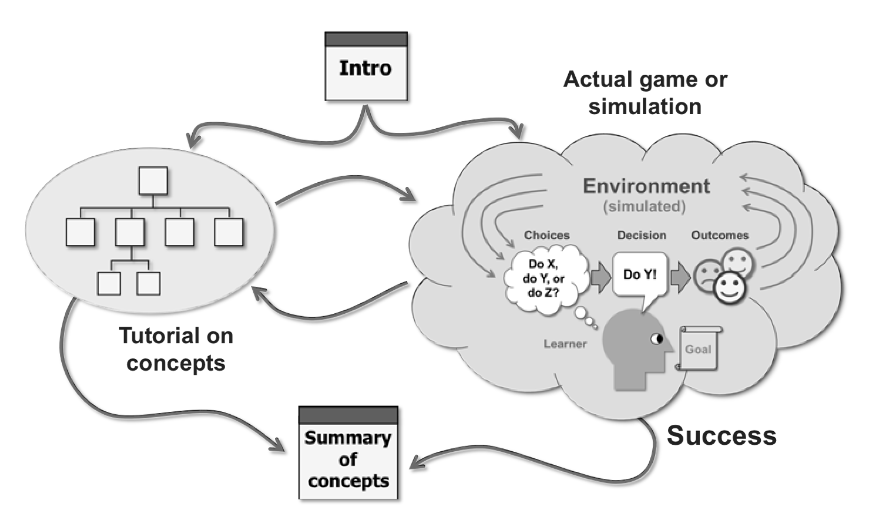
Games and simulations allow learners to practice concepts and apply new learning in low-risk and fun environments. They range from simple puzzles to complex environmental simulations and can be designed in such a way that learners “win the game” by accomplishing the learning objective (Horton, 2012).
I am by no means a game designer, and nor do I expect anyone developing an e-Learning course to have those credentials either, but there are many types of game activities that can be used to accomplish different types of learning objectives. Here are some examples mentioned in E-Learning by Design (Horton, 2012).
If the learning objective involves the learner deciding something, a branching scenarios or personal response simulation can be used to allow learners to experience the consequences of their decisions and think of new strategies to help them make decisions. If the learning objective involves the learner just gaining a basic understanding of a new concept or developing background knowledge on a topic, then a quiz-show game or word puzzles can help learners exercise and test recall of information (Horton, 2012).
Making Your e-Learning Course Mobile
Mobile learning involves the use of tools that allow the learner to learn anywhere, anytime. This is particularly important for busy students who cannot participate in synchronous learning or may have to interact with course content whenever they have a brief moment. Making your e-Learning accessible for on-the-go learners is another thing that can make your e-Learning course successful.
Developing e-learning for the mobile learner is challenging because mobile devices come in all shapes and sizes, and have varying levels of quality and resolutions (Legault, 2020). On top of that, there are various levels of accessibility to mobile devices, and assuming that all learners will have the same devices or even have them is a bold prediction to make. That said, there are a few tenets to keep in mind when trying to think of how to overcome some of these limitations. For example, not every learner has fast internet, so providing alternative access points for digital media that include both high bandwidth and low bandwidth resolutions could really make your material more accessible. Also, the learners situation and work activities may require some special design efforts (Horton, 2012). For example, some learners may be busy or engaged in activities that are more important than learning. For those instances, design e-Learning that can be paused and restarted at any time so learners do not lose their progress by stepping away.
Another way to design e-Learning that is mobile is to consider all of the capabilities of the device that is going to be used. For example, written assignments are often assigned in e-Learning, but if other media can be used to showcase the acquisition of a learning objective, why not allow the learner to use voice presentations or video to submit their assignments? Also, consider using voice recordings in presentations to present information in more ways than just simply visuals and words. Technology can make learning more accessible, so why not use all of the capabilities? These are just a few suggestions.
In summation, games, simulations, and making your e-Learning mobile friendly is a way to increase engagement and interaction. With all of these technological tools available, it is time to start leveraging them for e-Learning that is geared towards the 21st century learner.
References
Arshavskiy, M. (2019, March 1). How to Design eLearning Games that Drive Results? Your eLearning World. https://yourelearningworld.com/how-to-design-elearning-games-that-drive-results
Horton, W. (2012). E-Learning by Design
Legault, N. (2020). Best Practices for Designing Mobile Learning Like a Pro. E-Learning Heroes. https://community.articulate.com/articles/design-mobile-learning-like-a-pro-best-practices-for-mlearning
Bridging the Gap Between E-Learning Experiences and the Rest of Your Life
“If Absorb activities are the nouns and Do activities are the verbs, then Connect activities are the conjunctions of learning.”
– William Horton, E-Learning by Design
In my experience developing an e-Learning course of my own, I have had to remind myself that the end goal of my e-Learning course should be to help learners achieve the objectives of the course and have the learning really stick. I have found this experience challenging because while my efforts have been directed towards developing a finished product that contains Absorb-Do-Connect Type activities along with assessments, I think that I have at times made the mistake of not seeing the forest for the trees. I have asked myself “am I developing these activities with the student in mind?”
I am a teacher after all, and when I am teaching my students in my physical classroom, I am acutely aware of the engagement and rigor that each of my lessons have. I can formatively assess students based on their work, and provide feedback in the moment. However, as I have developed the activities for my e-Learning course, I don’t see students interacting with the content of the course in an immediate fashion. It makes me wonder about the effectiveness of the e-Learning activities when I have no students to “test it out on” yet. One thing has helped me keep students in mind, and that is the concept of brain-based learning. Keeping in mind a few simple tenets of brain-based learning can help you develop learning activities with the students’ perspective in mind.
What is Brain-based Learning, and How Does it Connect to E-Learning Design?
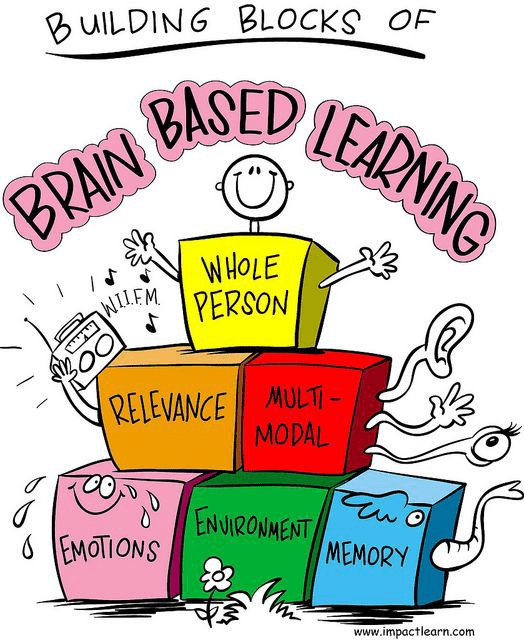
Brain-based learning is a concept based around the idea that learning is innate and linked to biological and chemical processes in the human brain (SH!FT e-Learning, 2021). In other words, the better you know how the brain works, then the more effective you can be at teaching, because you will understand the biological and chemical processes related to memory, attention, emotions, and how all of those things impact information retention and engagement.
As I have designed my e-Learning course, I have kept in mind one aspect of brain-based learning throughout each module, and that is the concept of active learning. Students learn best by doing. Since my e-Learning course is based round having learners become more proficient in the use of the LMS platform Google Classroom, I have realized that just packing the course with slideshows, screen-casts, and quizzes will not help students meet the goals of the course. Instead, each module will have students learn by doing. When people learn by doing, they become energized, they stick with the content, and they learn more, which increases the blood flow around the body. This improves learners’ memory, retrieval, and confidence (SH!FT e-Learning, 2021).
I have also learned about ways to not only improve my e-Learning course, but my teaching in general. In E-Learning by Design by William Horton, the topic of “connect-type” activities are discussed in Chapter 4. One connect-type activity that closely connects to brain-based learning is storytelling. Storytelling is a way to evoke emotions, and Horton mentions stories by learners as one of the most effective connect-type activities you can do, especially when learners can tell stories that relate to the content that is being taught. (Horton, 2012)
To Test or Not to Test: That is the Question
Through the development of my e-Learning course, I have also learned quite a bit about using tests to measure achievement of learning objectives.
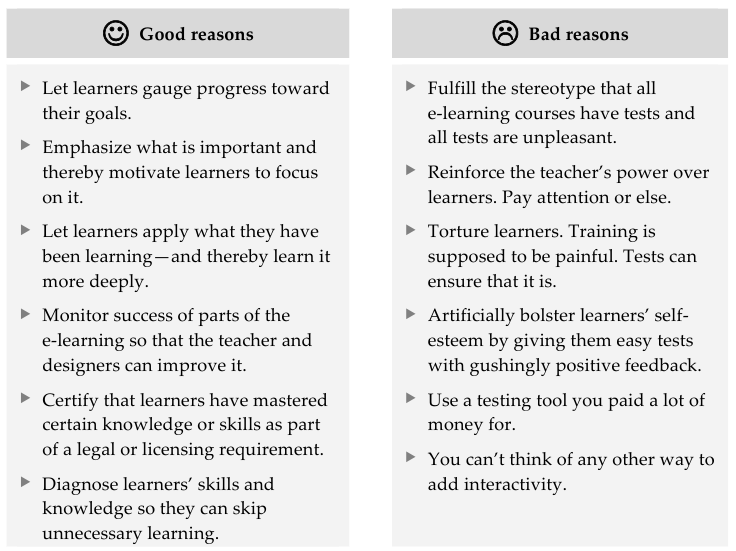
My outlook on tests has transformed quite a bit in my years as a teacher. I used to think that testing was always necessary, and tests were always high stakes affairs. However, as I have developed my e-Learning course, I have learned that tests do not always have to be like that, and in some cases, traditional tests are not necessary nor sufficient for learners to demonstrate learning. For example, would a test be the best way to measure whether or not students could create accessible classwork with multimedia on Google Classroom? I have found oftentimes that do-type activities themselves can be just as effective for the purposes of assessment. Different types of assessments can include things like open-book assessments, tests taken with partners, or learning games with puzzles. Also, when you have learners self-assess, assessment becomes a much more empowering experience.
References
Horton, W. (2012). E-Learning by Design
SH!FT e-Learning. (2021). A List of Brain-based Strategies to Create Effective eLearning.
Absorb-Do-Connect: Combining e-Learning Design and Professional Development
by Nick Gurrieri
E-Learning Design
To put it simply, e-Learning is learning that recruits computer and network technologies for the purpose of learning. E-Learning is defined in many different ways, however, as some believe that e-Learning happens with a computer and web browser while others think that other software and technologies are necessary to truly make e-Learning a full educational experience (Horton, 2012).
Instructional design governs every decision when it comes to selecting, organizing, and specifying the learning experiences that are necessary to teach. When I think of instructional design in a physical classroom learning environment, I think of the scope and sequence of lessons within the curriculum, and also the materials, technology, media, and learning activities required to teach every topic. I also think about the formative and summative assessments used to measure learning throughout lessons or at the ends of units. In an e-Learning context, those learning experiences and materials are well explained and outlined in the book E-Learning by Design by William Horton. This book has helped me develop the contents of an e-Learning course of my own.
Good learning design prevents many of the common failures of instruction, like trying to teach too much, failing to teach the important and necessary concepts, omitting supporting objectives, and forcing people to learning in ineffective, or even embarrassing ways (Horton, 2012). As I have learned more about e-Learning design, I have been able to consolidate much of what I have learned into two major categories:
- How to identify and design “absorb” activities for an e-Learning environment.
- How to identify, evaluate, and design “do” activities in an e-Learning environment to determine the best activities for different situations.

Absorb-type Activities in an E-Learning Environment
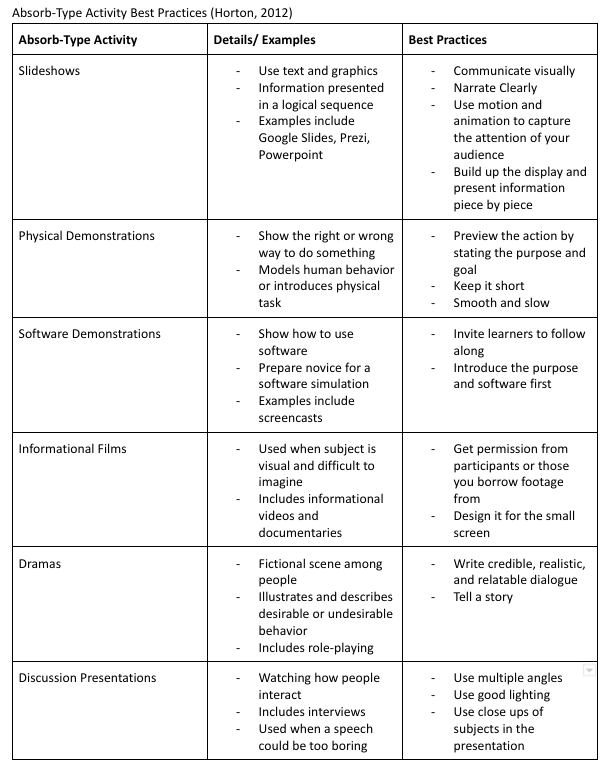
Absorb-type activities are the activities pertaining to the absorption of information, and are often intended to prepare learners for a subsequent “do” activity. Many educators and learners, myself included, think of absorb type activities as presentations, readings, or demonstrations, like slideshows, lectures, and paper documents. However, the umbrella of absorb-type activities encompass presentations, slideshows, physical demonstrations, software demonstrations, informational films, dramas, and discussion presentations (Horton, 2012).
This outline provides a recap of the purpose and best practices of each type of absorb type activity.
Do-type Activities in an E-Learning Environment
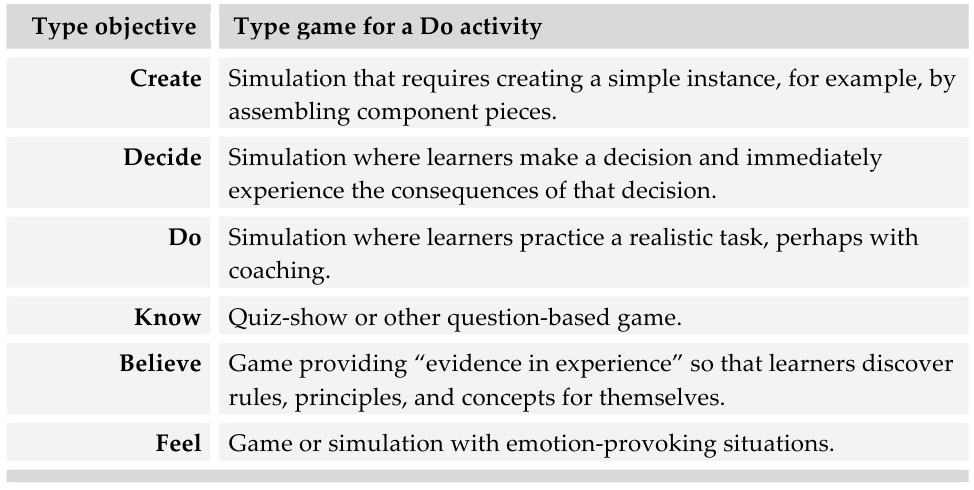
Do-type activities can be broken down into 3 main categories: practice activities, discovery activities, and games/ simulations. These activities prepare learners to apply skills, reveal principles, stimulate curiosity, and give learners a risk free way to apply their learning. In the context of learning design, these activities should be used depending on the topic, learning goal, and audience.
For example, practice activities like drills, hands-on activities, and guided analysis activities help learners adapt their knowledge, automate their skills, build confidence, and usually are composed of lower order thinking tasks so learners can build up to more complex tasks (Horton, 2012). Drill and practice tasks might be used for teaching a foreign language so the learner can practice conjugating verbs in different tenses, while hands on activities might be used for teaching practical skills, like cooking or measuring. Guided analysis activities usually provide some sort of scaffolding for learners so they can compare or contrast information or classify items into categories.
Discovery activities like virtual labs or case studies are used for exploratory learning, and enable learners to reveal principles about worldly phenomena (Horton, 2012). Virtual labs in an e-Learning environment can be used as a substitute for real labs, or can be used for abstract experiments where materials are not available or simply not possible to obtain (Horton, 2012). Case studies allow learners to extract abstract, general principles from real world samples. A learner may analyze a spreadsheet and provide an analysis of errors made. These tasks are higher order in nature, but like practice acitivites, have their time and place.
Games and simulations turn learning into play. They should be designed with the objective in mind, and work well in conjunction with presentations. Word-puzzles, quiz-show games, personal response simulations with branching decisions, and simulations for calculations are all examples of games or simulations as do-type activites (Horton, 2012)
Looking Ahead: E-Learning Design
As I develop an E-Learning Course that focuses on Google Classroom, I have been able to plan, and even develop some Absorb and Do Activities for learners. Here are some of the ideas I have generated so far both after reading Horton and getting feedback from my peers.
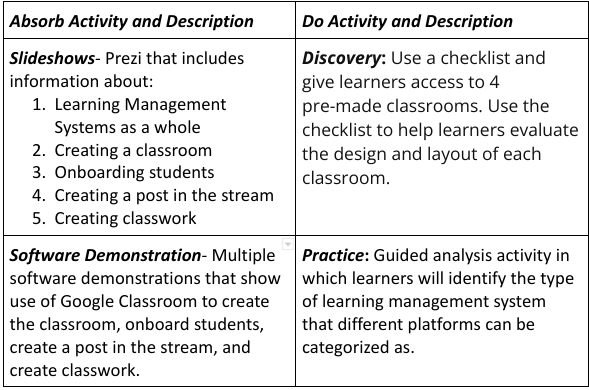
I have learned so much about E-Learning Design, and look forward to learning about Connect-type activities and creating the final product of my Google Classroom Course.
References
Horton, W. (2012). E-Learning by Design.
Final Reflection: Integrating Technology into Education
by Nick Gurrieri
Upon conclusion of this course, I now have the time to reflect on the myriad of technologies that I have had the opportunity to experiment with and try to tie into my lessons. The technology that I enjoyed working with the most was digital presentation software. Prezi in particular is something that I could see using not only to deliver instructional content to my students, but also as a way to have my students accomplish higher order thinking tasks.
Here is a link to the activity I created as a model for my students as they studied terrestrial ecosystems.

The technology that I found most frustrating to work with and the least helpful was mind-mapping technology. Mind-mapping technology like bubbl.us was clunky and visually overwhelming. While I like the utility of the technology and it’s ability to save mind-mapping activities in one place, I doubt its usefulness in relation to just doing it with pencil and paper. Here is what I created as a model for my students. As you can see, this is very overwhelming, and using the interface was frustrating. Many of the sub-categories overlapped and in hindsight I think the activity would be more effective on a poster board.

The activities in this course have changed my view of technology for teaching and learning because they have helped me understand how to transfer Bloom’s Taxonomy to Bloom’s Digital Taxonomy, and have given me many ideas on how to structure more complex tasks for my students with the aid of technology. The possibilities for having my students create, evaluate, and analyze using technology are boundless.

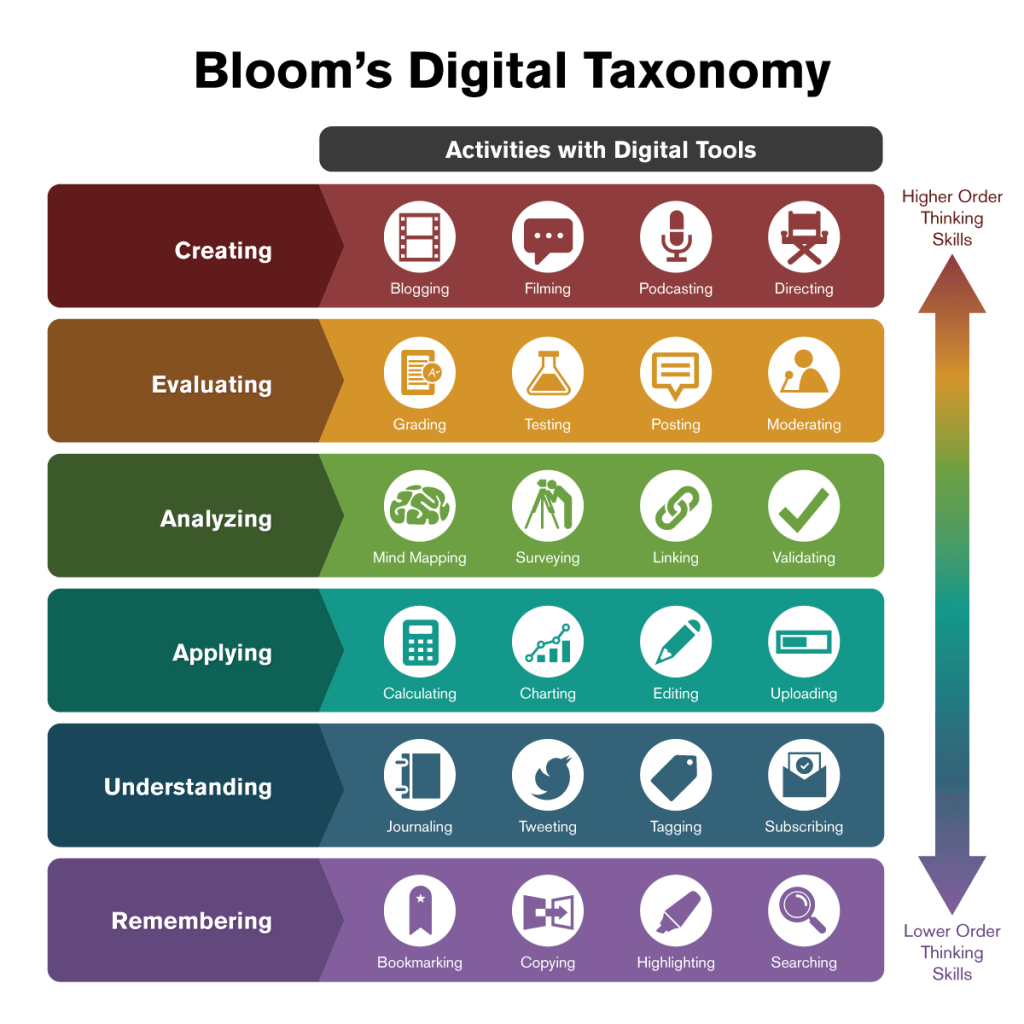
For example, “creating” remains at the top of the hierarchy, but the different types of things that students can create completely open up when technology tools like podcasting, digital storyboards, and presentation software is used. I plan on using these types of technology in the future, and finding ways to work them into the curriculum I teach.
Are Immersive Learning Technologies and Mobile Learning Technologies a Threat to Authentic Learning Experiences?
Do you often find yourself at odds with implementing new technology in your classroom? Technology has had an incredible impact on our lives. On the one hand, it allows us to create, research, and engage with others at a speed and scale that is exponentially greater than what we could do before the digital age. On the other hand, we dread the possible impact that technology can have on our interactions with others and our ability to socialize. Relevant research has proven that technology could change education by negatively impacting students’ competences of reading and writing, making educational environments less authentic, distorting the in-person interactions between learners and students, and isolating learners (Alhumaid, 2019).
Two cutting edge technologies that have significant implications for the future of education are mobile learning and immersive learning technologies. Virtual reality, 3D learning environments, and easily navigable apps that can be accessed in the palm of your hand seem to be not only extremely helpful, but inevitable next steps in the next stages of education. However, is it possible that the negative aspects of these technologies can outweigh the perceived benefit that they have?
Immersive Technology
Immersive technology can be described as 3D virtual learning environments that allow the user to have an experience that partially or fully immerses them in an alternate universe, popularly referred to as the “Meta-verse”, or a universe within our real world experience. The implications for this type of technology on learning are positive in many ways. First, virtual learning environments allow students to observe visualizations that are not possible in the physical classroom (Hicks, 2021). For instance, learners can take part in a simulation that places them in the heart of the Amazon Rain-forest, an experience that would be completely impossible in the physical classroom. Using zoom and pan features of the virtual reality simulation, students could zoom in on a leaf and be taken to a separate presentation that describes the different types of leaves you would see in this ecosystem. Also, immersive technology creates interest (Hicks, 2021). They have the capabilities of adding a tactile component to reading, listening, and viewing. This multi-sensory experience adds to the immersion students feel, which increases their willingness to engage with learning content. Finally, immersive technology can allow learners to participate in higher order thinking tasks like creating, collaborating, and problem solving with absolutely no physical materials other than a VR headset (Hicks, 2021). Imagine that instead of identifying and defining the different types of extreme weather, students used an immersive learning technology to build a virtual home that could withstand the force of a tornado or blizzard. The possibilities are exciting to say the least.

On one side of the coin, however, there are some negative implications when it comes to immersive learning. Immersive learning also has the potential to deteriorate human connection (Hicks, 2021). When the learning experience is just you and the software, it eliminates the ability to collaborate and work with your peers. In this way, the learning experience can be cheap and inauthentic. Also, the lack of flexibility and widespread access to the resources create issues in lower socioeconomic districts or smaller school systems (Hicks, 2021). VR headsets may be a luxury that wealthy school districts may provide, but in the majority of school districts, access would be severely limited. To make matters worse, it is not as though the immersive experience could be done without the headsets. Headsets make the experience possible, and without them it would severely limit the capabilities of the software. Finally, addiction to virtual worlds is a growing concern for the younger generation of students (Hicks, 2021). With so much time already spent playing games and using technology, would we just be making the problem worse, and essentially fueling the dependency to technology that we are witnessing with increased regularity? These are all things worth thinking about.
Mobile e Learning
Mobile e Learning refers to learning that can occur outside of the physical classroom using 1 to 1 devices. With mobile learning technology, students can learn on the go, and educators have an improved ability to reach under-served children (McQuiggan, 2015). It can increase the potential amount of time the learner spends engaging with learning content, and is engaging to boot. The familiarity that students already have with these mobile technologies actually serves as a benefit at times if the technology is used correctly. Additionally, mobile learning technology can improve higher order thinking skills as well, because critical thinking, problem solving, creativity, innovation, and collaboration are all things that mobile learning technology can foster (McQuiggan, 2015). Learning can be easily personalized since students are able to engage with learning content at their own pace, and learning paths can be easily customized by educators.
The negative aspects of mobile learning are clear as well. For one, the different levels of access to this technology are a big hurdle for low income families and school districts, which makes ease of access a problem much like immersive technology (McQuiggan, 2015). To add, student use needs to be closely monitored, as distractions and unethical use of the technology is a real potential problem (McQuiggan, 2015). Prevailing attitudes about mobile devices also create an obstacle for some more veteran teachers to overcome from a pedagogical standpoint. Many teachers regard these devices as a distraction, and they in many cases will still be a distraction when used in the classroom. For all of the pros to using mobile technology, the cons are prevalent and significant.
What to do now? I think the best way to approach this is to be minful of the technology you are using. Not all technology is created equal, and some are more useful than others. Take a look here and here to see some of the best resources for educators who are looking to use mobile learning technology or immersive technology.
References
Alhumaid, K. (2019). Four Ways Technology Has Negatively Changed Education. Journal of Educational and Social Research, 9(4), 10–20. https://doi.org/10.2478/jesr-2019-0049
Hicks, P. (2021, May 12). The Pros And Cons Of Using Virtual Reality In The Classroom. eLearning Industry. https://elearningindustry.com/pros-cons-using-virtual-reality-in-the-classroom
McQuiggan, S. (2015). Mobile Learning (Wiley and SAS Business Series) (1st ed.). Wiley.
Mid-Course Reflection: Digital Media Presentations and Game-based Learning/ Gamification
These past few units have answered some important questions I had regarding how to implement new technology in my teaching. The past 2 units of this course have focused on two things: Digital presentation software, and game-based learning/ gamification. I started these units with some questions. I wondered: how could I create presentations that both captured my student’s attention, but also utilized technology other than PowerPoint or Google Slides which I have become very accustomed to? Second, I wondered, how can gaming principles be used to engage students?
Digital Presentation Software
What makes a good presentation? How can I adapt those principles to work in a k-3 classroom? Considering that this is the teaching environment I am immersed in, this was the lens I viewed the learning materials from.
Audiences are easily distracted, and it is hard to keep their attention (Mandel Communications, 2009). The best way to combat this is to take a listener centric approach, and find ways to relate to speakers. The idea that what you are saying is most important should take a backseat. The fact that your listeners need to comprehend and attend to what you are saying should come before what you are trying to tell them. Less is more, so relevant visuals and thought provoking discussion questions do a lot more for your audience than inundating them with information.
I spent my time last unit creating a presentation that I felt I would find useful for teaching the subject of ecosystems. Creating the presentation was eye-opening; I used Prezi to develop an interactive presentation that went outside of the typical PowerPoint or Google Slide model. The creation of the presentation really me think about whether or not I was including too much information and using visuals effectively. It took some time, but I ultimately created something I was proud of. The point of this wasn’t just to learn how to create better presentations that I would administer to students. I also learned how I could have my students use these platforms and presentation tools during deep learning experiences.
Game Technology in Education
Game-based learning is when the game is the learning. Gamification happens when gaming principles such as badges, multiple paths of learning, and other motivating features are added into the learning process, though the content remains the same
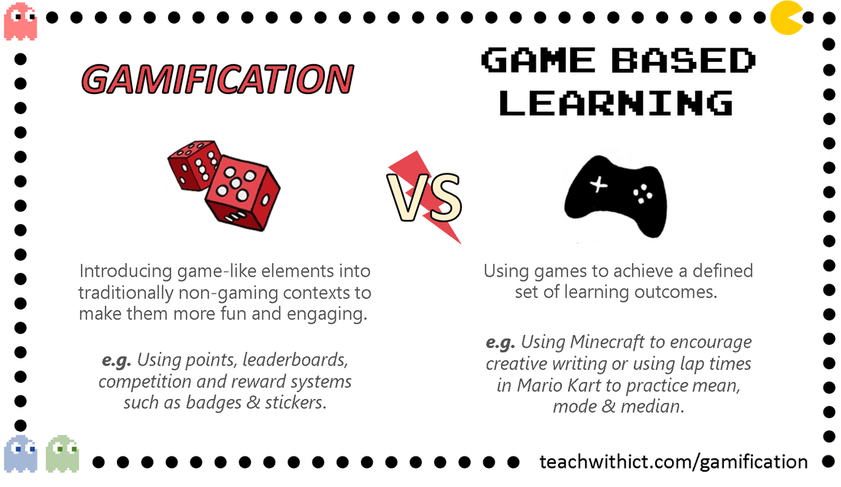
Using games in the classroom doesn’t have to be something that is done in addition to or as a break from learning. Games can be the vehicle through which learning happens, and gamification principles can be implemented in your classroom to engage students.
According to studies done in the early 2000’s, the potential for game-based learning in the classroom has always been apparent. That said, prior to the widespread use and availabilty of technology in schools, teaching with games was always seen as a challenge. Fixed time for curriculum made implementing games a challenge, and teachers really needed to know their curriculum well before they used a game to teach (Sanford et al., 2006).
Simple gaming principles, like changing the framing of a learning goal to a “quest line” with “main quests” and “mini quests” can engage students. Also, recognizing progress with badges and other incentives creates a sense of achievement that makes students more invested (Kiang, 2014). Many online platforms implement these gaming principles, such as Khan Academy, ReadTheory, RAZkids, and others.
I have learned many things in this course already, and these past few units have already added to my “teacher toolbox.”
References
Mandel Communications. (2009). Best Practices for Excellent Presentations in the Virtual World. Mandel Communications.
Kiang D. (2014, October 14). Using gaming principles to engage students. Edutopia. https://www.edutopia.org/blog/using-gaming-principles-engage-students- douglas-kiang
Sanford, R., Ulicsak, M., Facer, K., & Rudd, T. (2006). Teaching with Games. Futurelab.
2 Ways to Meaningfully Integrate Technology
by Nick Gurrieri
What concerns do you have about the integration of technology in the classroom? I would wager that many educators who want to use technology in meaningful ways are often faced with the dilemma of not just when, but how to use technology. Technology is most effectively integrated when it is used to enrich the learning experience rather than just digitize it. The use of technology related to collaboration and data analysis will be discussed in particular.
Using the Internet to Increase Collaboration
Educational resources related to social networking can increase collaboration. The importance of teamwork and collaboration can not be understated: It has been shown that teamwork and collaboration increase creativity, allow for faster execution, build community and morale, and increase overall productivity in professional and academic environments (Bit.ai, 2021).
Integrating social networking tools can help teachers. One advantage of using Social Networking tools in the classroom is that to many students, it is already familiar to them. They have experience, and know how to use it (Young, 2020). In this way, it becomes easy to integrate it into your teaching as long as it is done thoughtfully.
Some ways to use social media in the classroom include the use of Twitter/ Facebook to tweet or post status updates as a class for parents. Students can write blog posts, connect to other classrooms, or create video projects that can be uploaded to YouTube (Davis, 2014). A variety of platforms exist that are safe for classroom use. Take a look at this link for some ideas on how you can integrate social networking into your classroom in a safe, engaging way.
Using Technology to Increase Rigor
Many educators are very familiar with the terms Blooms Taxonomy and Depth of Knowledge. However, did you know that there is an entire separate digital taxonomy that can be used to amplify the rigor of tasks?
Bloom’s Taxonomy is a hierarchical classification system used to distinguish between the levels of human cognition. As you can see in the figure below, the lowest level of human cognitive tasks are classified as “remembering” and “understanding” tasks. The ability to recall facts and basic concepts has it’s place, but in regards to it’s level of cognitive “lift” that we want students to spend most of their time doing, this falls at the bottom of the hierarchy. Defining, classifying, duplicating, listing, repeating, and stating are all regarded as lower level tasks because they require a shallow level of understanding to accomplish. As you move up the pyramid, the highest level tasks, like analyzing, creating, and evaluating all require the deepest level of understanding to do. It is useful as an educator to look at the cognitive level of tasks that you are having your students complete. While there is a time and place for activities at the lower level of the pyramid, are you having your students spend a majority of their time completing tasks related to remembering or understanding? Or, are you having students spend most of their time completing cognitive tasks that are related to creating, evaluating, and analyzing?
The figure below provides another way of interpreting Bloom’s Taxonomy in the digital age. As you can see, the higher order thinking skills are listed at the top of the hierarchy, but the question remains, what type of cognitive skills that are highest on the continuum can be accomplished with the use of technology?
Bloom’s Digital Taxonomy provides a framework for educators who are asking that question. Let’s take a look at learning objectives that would be something you would see in a classroom if you were to create a unit using Bloom’s Digital Taxonomy as a guide as you created learning goals.
- Remembering– Students will be able to identify a search engine that can be used to find reliable information related to weather in their city
- Understanding– Students will be able to tag and create bookmarks for reliable resources
- Applying- Students will be able to edit a Wiki page that describes the weather patterns in their city
- Analyzing- Students will be able to examine weather data in their city using reliable online databases
- Evaluating– Students will be able to support a claim about the climate of their city using evidence from weather databases
- Creating– Students will be able to create a weather report video that predicts the weather in their city
As you can see, all of these different tasks have their value in the classroom, but if you want to really increase the rigor of what you are asking students to do, look no further than Bloom’s Digital Taxonomy.
References
Bit.ai. (2021, July 5). Importance of Teamwork & Collaboration in a Digital World. Bit Blog. https://blog.bit.ai/importance-of-teamwork-and-collaboration/
Davis, V. (2014, February 27). A Guidebook for Social Media in the Classroom. Edutopia. https://www.edutopia.org/blog/guidebook-social-media-in-classroom-vicki-davis
McNulty, N. (2021, November 24). How the Best Teachers use Bloom’s Taxonomy in their Digital Classrooms. Niall McNulty. https://www.niallmcnulty.com/2017/11/blooms-digital-taxonomy/
Young, J. (2010, July 22). How Social Networking Helps Teachers (and Worries Some Professors). The Chronicle of Higher Education. https://www.chronicle.com/article/how-social-networking-helps-teaching-and-worries-some-professors/
Final Reflection: Emerging Technology Trends in Education
by Nick Gurrieri
Digital Collaboration
Recent technological developments have allowed a great deal of collaboration to happen digitally. The importance of teamwork and collaboration in any setting, be it corporate or educational, is well documented. Collaboration and teamwork foster creativity, increase morale and productivity, and it can help build community (Edelen, 2019). In my grad school studies, I have completed all of my work asynchronously. Even the group projects were asynchronous, and I have felt something missing. It turns out I am not the only one. In a recent study, many students who learned remotely mentioned numerous challenges they were faced with. They discussed the lack of challenge they felt in remote courses, and felt they were missing out on the full experience of learning. They also mentioned that many of their frustrations stemmed from lack of consistency, and distractions (Herman, 2020). Most of all, which I can empathize with the most, was the feeling of isolation. I learn best when I feel a sense of community, which has been sorely lacking in my current foray into grad school even though it is the only option I have with my schedule.
That is why getting a chance to use online collaboration tools, like the Collaborate function on Blackboard was so beneficial. It got rid of that feeling of isolation and having to learn everything myself, and helped me feel connected to like minded learners who I had a similar background with.
If I were to collaborate in the future, I would have preferred to use a collaborative tool like Google Meet, which had more features and would have allowed many simultaneous meetings to occur with my colleagues. One of the downsides of using the Collaborate feature is that it was always intended to be used by instructors with a large group, but when I had to use the feature with just 2 other group members in a class with 3 other groups, coordinating meeting times was a struggle. That said, Collaborate provided that feeling of community and helped me efficiently communicate with my group mates.

During our collaboration time, we shared valuable insight on how to complete our group project, and shared different tools that we had used in the past to help us create our final video. We talked about screen-cast tools, and shared methods and different techniques to edit videos using editing tools. Discussing tools like Screencastify and video editing software like WeVideo helped open my mind to the possibilities of how I could not only use the technology for the project, but in my professional setting as well.
From Theory to Practice
In this course, I have learned about 2 major things that I feel will transform my teaching practice. One of them is how to create more engaging lessons and activities with multimedia technology, while the other is how to make effective use of digital collaboration technology.
During Unit 5, we discussed multimedia technology in education. One of the major takeaways of this unit was the fact that there are so many great tools for teachers to use that can be used for video creation by students rather than just by teachers. Tools like FlipGrid, EdPuzzle, and Prezi were tools I learned a great deal about in that unit. Following that unit, my interest was piqued on how I could use those tools with my thirds graders. I recently introduced EdPuzzle in my classroom and it makes my videos in my lessons so much more engaging, as I can embed engaging activities easily that my students can access from their devices. I made a choice to try something different, and it will become a staple in my teaching practice in the future.
Also, digital collaboration technology like Padlet, Seesaw, Popplet, and Kahoot are things that I used in my classroom previously, but in Unit 5, I learned how to use them more efficiently for the express purpose of collaboration. For example, by combining my knowledge on effective questioning and my expertise with Padlet, I was able to teach my students how to generate open-ended questions, and then pose open ended questions to the class on a live virtual discussion board that updated in real time. Students were able to respond to one another’s thoughts, and the activity was one of the most enriching, deep discussions we had all year. Padlet made it even more engaging.
If you are an educator and you are unsure of what technology to add to your repertoire, there are some great resources that discuss digital collaboration tools you can include in your classroom. Click the link here to check it out!
References
Edelen, P. (2019, July 09). The importance of collaboration technology to workplace culture.
Herman, P. (2020). Online Learning is Not the Future.
A Whole New Type of Engagement: Multimedia in Education
by Nick Gurrieri
“Education is not preparation for life; education is life itself.”
– John Dewey
Whenever I come across John Dewey quotes, I think about his philosophy and that learning happens by doing. If you want your students to become better writers, they need to write more. If you want them to become better mathematicians, have them explore math. The teacher needs to be a facilitator with the sole job of engaging students and creating an environment where that exploration can occur. All I can think of, however, is how in the modern era, learning demands the integration of technology. In fact, it is mentioned in the National Curriculum Framework dating all the way back to 2005 (Chakraborty, 2019).
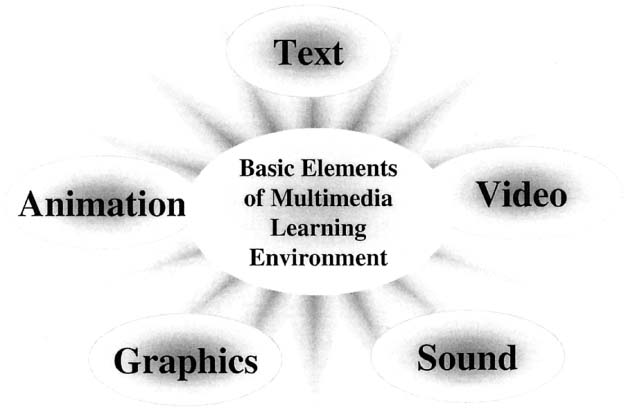
In this most recent unit of learning, I have explored how multimedia in the form of digital video and audio technologies can transform the classroom. Using digital collaboration tools to stream live video in order to collaborate with classmates, to actually creating video and audio files as part of learning, there are so many ways educators can use multimedia to enhance learning.
Collaborating with Technology
Collaboration is something all students need to learn how to do to succeed in the future. Studies dating back to before the 2000s recognized the need for organizations and campuses to redesign their infrastructure and approach to support collaborative work (Kezar, 2006). Collaboration helps cut down on workload, find new solutions to problems, and manage resources in a way that benefits all collaborators (Kezar, 2006). Additionally, collaboration and teamwork hold many benefits in the workplace. Some of these include improved creativity, productivity, morale, and problem solving skills. It also has a social emotional effect, as it can increase the sense of community and lead to personal and professional development (Edelen, 2019). In the digital age, collaboration looks different, and there are many technological tools that can be used by educators to help students build their collaboration skills. The question remains, what tools should you use?
The best tools for digital collaboration are ones that allow students to connect with one another seamlessly both in and out of the classroom. Some of these tools include:
- Diigo: A content curation resource that can help students bookmark resources for project based learning or group work.
- FlipGrid: Students can use FlipGrid to create short video-logs that allow students to share ideas and opinions in a fun and hands-on way, as video submissions are often more enticing to students than a written response (TeachThought, 2022)
- Padlet: When students use Padlet, they can post multimedia on a virtual corkboard. Students can reply to or like each other’s posts as they would when using a social media platform.
- Video streaming tools like Google Meet, Zoom, or BlackBoard Collaborate: Video streaming is all the rage since the pandemic hit. It saved teachers during remote learning and allowed us to connect with students anywhere, and allowed them to collaborate with each other. They will be a mainstay in classrooms for years to come especially as infrastructure develops to support it.
Using Video/ Audio Technology in Education
Using video and audio technology in your classroom takes lots of preparation and careful thought about how it will be implemented. It is not simply a panacea that instantly makes everything better. However, when it is used by an experienced teacher who planned it out well, it is transformative.
Video and audio technology is already a huge part of young students’ lives. YouTube is now the second-most-popular website in the world. In a recent study, 27 percent of prospective teen students stated that YouTube videos were not only what they used to research where they would go to college, but they were instrumental in their decision on where they would go to college (Shearer, 2020). We know that students engage with video technology, and I can anecdotally state that a number of my third graders over the past few years have stated that their dream job when they grow up is “YouTuber.” When you use video streaming tools and video/ audio editing software with students, it can bring the best out of them.
Here are some video and audio creation/ editing tools that teachers around cited as useful in the classroom:
- Screencastify: Screencastify allows students to capture their own screens with the click of a button. Teachers have found very interesting uses for this, like allowing students to show what they’re thinking from wherever they happen to be working, reducing cheating as teachers can observe students working and explaining problems instead of just recording answers (Eckert, 2021)
- Prezi: Virtual presentation software offers teachers another tool to capture short lectures, explanations, or other content in a more visually appealing way (Eckert, 2021)
- Seesaw: Seesaw allows students to create video and audio in it’s “Creative Canvas.” It can allow teachers to make assignments that are more than just simple written words.
Visit this resource here to see some of the best online tools for student collaboration.
References
Chakraborty, M. (2019). Impact of Multimedia on Learners’ Engagement: An Experimental Study. Journal of Information and Computational Science.
Eckert, J. (2021, February 5). 10 Teacher Picks for Best Tech Tools. Edutopia. https://www.edutopia.org/article/10-teacher-picks-best-tech-tools
Edelen, P. (2019, July 09). The importance of collaboration technology to workplace culture.
Kezar, A. J. (2006). Redesigning for Collaboration in Learning Initiatives: An Examination of Four Highly Collaborative Campuses. The Journal of Higher Education, 77(5). https://doi.org/10.1353/jhe.2006.0043
Shearer, J. (2020). Make videos that click with prospective students: Inside higher ed.
TeachThought. (2022, January 28). 30 Of The Best Digital Collaboration Tools For Students. https://www.teachthought.com/technology/best-digital-collaboration/
Beyond the Four Walls of the Classroom: Digital Learning in K-12 education

Education has transformed education. Once seen as an add-on, or even a distraction (which in the wrong hands it can still sometimes be just that), digital learning tools have allowed teachers to use video, audio, and other multimedia to engage students in new ways. Additionally, tools like Learning Management Systems have provided teachers and students the ability to engage with one another, even outside of the traditional classroom environment. Technology is no longer seen as a supplement to the classroom or an “add-on.” In the digital age, where digital literacy has become almost as important as being able to read, technology in the classroom is now recognized as having the same level of importance as pencils or desks. In my recent studies, I have learned about digital learning and even reflected on my own practices and how they related to digital learning.
Digital Learning Tools Can Bring Lessons to Life
Research shows that when students are able to relate what they are learning in the classroom to the real world, they make better connections. The same can be said when they relate what they learn in the physical classroom to the digital learning environment (Marks, 2019). Digital learning tools can allow students to create connections to the real world. Simulations and virtual field trips can bring lessons to life, and in recent times, getting out of the classroom is not always feasible (Waldman, n.d.).
Seeing this happen in a classroom opened up my eyes to the possibility of how I could incorporate it into my own teaching practice. Every year, my third graders work on a research writing unit focusing on National Parks. Each year, I provide the resources, typically in the form of websites, books, articles, or informative videos that students use to find answers to guiding questions they develop prior to starting their research. This school year, I found a virtual field trip online for each of the parks we focused on. I saw firsthand how technology not only engages, but empowers students in the learning process. The sense of control they had over their own learning during this unit was apparent. The students were able to take virtual tours of their park, and answer the questions they had come up with in regards to the history, animals, and plants of the park. A field trip to the parks themselves wasn’t in the cards, but VR technology enriched their learning experience in a way that simply reading about it couldn’t.

Technology Enables Social Learning and Boosts Creativity
Digital learning platforms allow students to socialize, collaborate and interact with each other both in and out of the classroom. Gone are the days where students can only work with or interact with their peers in their studies within the classroom. Now students can take their learning just about anywhere, and interact with their peers at anytime. Tools like Jamboard, a digital tool that integrates with Google Meet, is an excellent tool that can help engage students who are both at home, and in class (Lyding, 2021). The Jamboard is an interactive whiteboard that allows students to collaborate on one slide in real time. I have used this tool recently to help students prepare collaboratively for a geometry assessment, and I was able to engage all my students, some of whom are learning at home during the pandemic.
Mobile Learning
Mobile learning, often abbreviated as mLearning, can also be effective tools in the classroom. A majority of students prefer using smartphones for learning, and in a recent study that looked at smartphone applications in Iraqi universities found that 86.95% of students have agreed upon the insertion of specialty-related computer and smartphones technology training in curricula (Mehdipour, 2013).
I haven’t explored mobile learning with my third graders, but apps like Evernote, Quizlet, and QuizUp are apps that my colleagues in secondary education in my district are already in use.
I have already learned a lot about digital learning in the recent weeks and look forward to implementing more of what I have learned in my teaching practice.
References
Waldman, C. (n.d.). Five ways technology can transform classrooms.
Marks, M. (2019, February 25). The future of effective digital learning and its role in the education system.
Lyding, L. (2021, January 15). 6 Ways to Jam on Jamboard: Using the Digital Whiteboard in a Hybrid Classroom. EduTopia. https://www.edutopia.org/article/6-ways-jam-jamboard-using-digital-whiteboard-hybrid-classroom
Mehdipour, Y. (2013). Mobile learning for education-benefits and challenges.
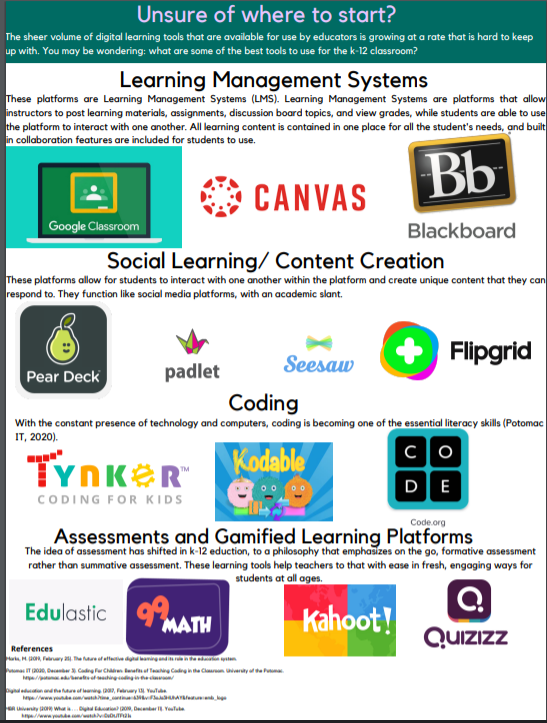
Info-graphic: Digital Learning Tools in the K-12 classroom
This info-graphic features a description of digital learning tools, and their applications in the K-12 classroom. Also, multiple tools are featured in the info-graphic, including a description of the purposes of the tools and their applications in the educational setting.

How I Came to Appreciate my Academic LMS: An experience in Bench-marking Systems
In the past two weeks, I began to analyze how different academic learning management systems (LMS) stacked up against one another. I had to consider how these incredibly useful tools could support the creation of a successful digital learning environment in my institution. I took a close look at Canvas, Blackboard, and Google Classroom. I wanted to get the full picture: How did the different systems compare to one another? What were the strengths and weaknesses of both in terms of how they met specific needs for K-12 education? How do the LMS allow teachers to create content that considers pedagogical best practice?
With those questions in mind, I explored how the three LMS mentioned met the criteria I had met through a process detailed in “The LMS Guidebook: Learning Management Systems Demystified.” The process is detailed below:

The first step was perhaps the most challenging. Making a needs analysis was difficult from the perspective of an educator, since the views of multiple stakeholders must be taken into account when making these decisions. I think that when I have the opportunity to do this in the professional environment, I will be able to make a more informed needs analysis, but for the sake of this, I identified some needs that an academic LMS has to have:
- Assessment creation
- Accessibility features
- Grading
- Ease of navigation
- Interoperability w/ current tools used in my institution
- Hybrid learning capabilities
- Explicit user support
A few of these needs were identified through my own experience, but also by consulting Foreman (2018) and Sharma (2020). Sharma referenced key features to look for in an academic LMS.
From that, I defined clear requirements. This was hard to do because at first, you want to identify requirements and define them as a problem that needs to be solved. After some practice and revision, I identified 10 clear, specific requirements, and looked at how each of the academic LMS met those requirements.
This turned out to be the most extensive part of the entire process. I had to use the systems and get a glimpse of what the experience was like from the perspective of both an instructor and learner. Mid-way through, I narrowed my requirements down in to categories. All my requirements had to do with accessibility, navigation, assessment, analytics, content, and social learning. Navigation was really the key piece that made me decide on the LMS that would be best for my institution. Overly cumbersome navigation and LMS functionalities that do not take into account the user on the other side of the LMS can hinder learning (Schroeder, 2020). Also, keeping the age group of my students in mind made this an easy decision. Canvas and Blackboard both have their merits, but for the purposes of elementary education and even upper/ secondary education, the navigability of Google Classroom and ease of use from a course creation standpoint and from the perspective of a student makes it superior for my environment.
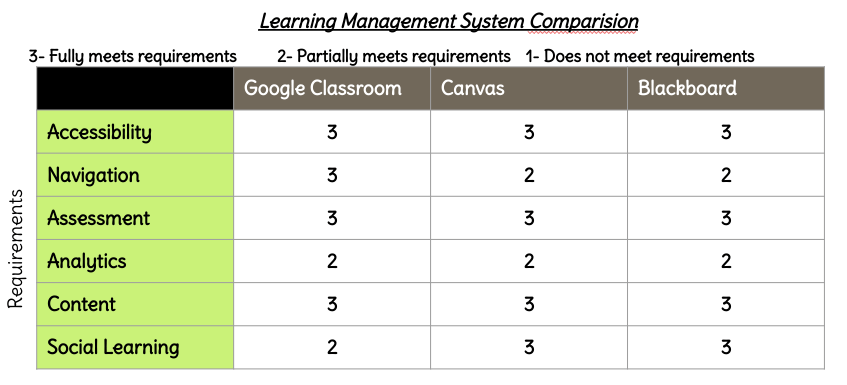
Funny enough, after all of the work I did on Canvas and my own experience as a user of Blackboard from the perspective of a student, I ended up siding with Google Classrooom, the LMS I have hands down spent the most time with and have been somewhat critical of ever since I started using it during remote learning. However, my use of Google Classroom has totally transformed as a result of this project. I used to use Google Classroom simply to organize assignments, but now have realized that it can do so much more. I learned how to utilize the quiz creation function, create discussion board topics for students to respond to, and I learned how to essentially post entire units that could be used for distance learning. I have learned to merge my teaching practice with the LMS.
One unforeseen outcome from this experience was that my eyes have opened up in regards to future career paths for someone with my background. I simply had no idea what was out there, but opportunities for working with an LMS was never on my mind before. Now it is.
Interested in Ed Tech careers? Take a look at this resource to see if there is something out there for you!
References
Foreman, S. D., & Association for Talent Development (2018). The LMS guidebook: Learning management systems demystified. Association For Talent Development.
Schroeder, S. (2020, July 14). Designing your LMS to make distance learning better. Edutopia.
Sharma, N. (2018). 5 must-have functionalities of an academic LMS. eLearning Industry.
Determining the best LMS for your organization
by Nick Gurrieri
The past few weeks of learning in this course have opened my eyes to the possibilities of learning management systems, even though my level of comfortability and experience using them is still in it’s infancy. I have had some time to dabble in creating a course using an LMS called Canvas. My experience using Canvas differed drastically from the other LMS that I have the most experience with, which is Google Classroom and Seesaw. I used these LMS mostly during the pandemic with my third graders. Google Classroom lacks some of the organizational features that Canvas does, and doesn’t have quite the extensive library of material that Canvas does. Canvas has a “Commons” feature that allows course creators to create content and then post it to a database that allows others to access it and reuse the content with their learners. This can save time for instructors and makes posting engaging content effortless.
I have learned many things about Learning Management Systems, and most recently I have learned that Learning Management Systems themselves abide by set standards, much like administrators and teachers do. These standards pertain more to interoperability and accessibility. According to Foreman ( 2018), there are many questions that you should ask yourself when using an LMS in any organization. These questions take into account many important considerations that all instructors and administrators should be aware of.
- Is your LMS accessible to all learners, including learners with disabilities?
- Is your LMS secure?
- Does your LMS reveal any personally identifiable information to third parties?
- Do you use multiple systems to share a common set of data?
There are 2 types of interoperability that pertain to LMS. One is interoperability between courses and an LMS. This ensures that e-learning courses developed with tools outside of the LMS can work optimally within the LMS (Foreman, 2018). Additionally, there is interoperability between learning systems. They allow different LMS to share data with one another, which comes in handy when a school is using multiple LMS or they switch from one LMS to another. The newest set of standards of interoperability is called cmi5 . It allows for offline mobile learning, records any kind of learning activity that can be happening in and out of the LMS, and enables studying outside of the LMS (Rustici Software, 2021).
Before implementing an LMS, it must be evaluated appropriately. From the perspective of an educator, the vetting process of an LMS seems to me to be much like the vetting process of any instructional material you will us with your students. To evaluate an LMS and its perceived usefulness, there are 5 major steps. First, you need to analyze needs of your institution. This involves considering the needs of all stakeholders into account. In a school, these stakeholders include parents, administrators, teachers, and support staff like IT. The administrators may have one set of needs for an LMS, but the teacher’s needs or the perceived IT difficulties associated with that LMS may discourage the implementation of the LMS. The needs of one may not be the needs of all, so that is why a needs assessment is necessary when trying to determine which LMS to implement.
Next, you must define the requirements that the LMS needs to have. These requirements must be stated unambiguously, and state the requirement in the form of a need, not a solution (Foreman, 2018). For example, a requirement that is stated unambiguously would sound like “The LMS user interface must be accessible on the most recent 3 versions of all iOS and Android devices.” This statement is specific and clear. Requirements must be stated in this way before the next step begins.
After that, you must vet products (Foreman, 2018). Decide the type of LMS you want, be it a corporate LMS, integrated LCMS-LMS, or academic LMS. From this list of requirements you developed, choose the 8-10 most important requirements to help rule out products that do not meet those requirements.
After that, you evaluate products. This, in and of itself, is a multi step process in and of itself. It involves reaching out to the developers of the LMS, trying out the software itself, and checking on the vendor health to determine longevity of the LMS (Foreman, 2018).
The process of analyzing an LMS has made me look to the future and even opened up my eyes to some career opportunities in my institution. We are always looking for an effective LMS to use, and my learning and experiences in this unit have really helped me understand learning management systems better and what makes them effective.
References
Rustici Software. (2021). cmi5: What is it and what are the benefits and tools. XAPI.Com. https://xapi.com/cmi5/?utm_source=google&utm_medium=natural_search
Foreman, S. D., & Association for Talent Development (2018). The LMS guidebook: Learning management systems demystified. Association For Talent Development.
Learning Management Systems: My Introduction
by Nick Gurrieri
Many teachers clearly remember March of 2020, when our education system (and the entire world for that matter) turned upside down. The emotions we felt were broad ranging: I bounced between frustration, impostor syndrome, feelings of pride and success, to crushing lows. For the first two weeks of the stay at home order, I made myself available to my students as they completed prepackaged work and did digital math lessons on a math learning platform. That was the best we could all do. The entire learning experience we were able to provide at first felt cheap.
As we got our proverbial ducks in a row, we implemented the usage of Google Classroom to try to salvage the year as much as possible. Google Classroom allowed us to do so much more: It allowed students to communicate with one another, allowed me to personalize and customize the platform to make it more engaging, had an assessment creation feature, allowed me to post live video chat links from Google Meet, and was compatible with screencast and video applications like Screencastify and WeVideo. I was able to create learning activities and host a weekly “genius hour” where students could come to me on Google Meet with any questions about the work that they needed to complete. Sometimes, these video sessions turned into simple conversations that really had nothing to do with academics. It allowed my students and I to feel connected with one another. The three months without my students were difficult, but having Google Classroom there really helped to fill a gaping hole that we all felt being away from school.
I was inspired to go into educational technology for my master’s studies in the midst of the pandemic, mainly due to my success using technology to support my students in a digital learning environment, and I wanted to learn new ways to improve and diversify my use of technology. In my recent studies about Learning Management Systems, something clicked for me: Google Classroom is one of many different learning management systems that can be a support system for a classroom or replace the classroom itself. As I have learned more about LMS in general, I see the massive positive impact they can have on learning outcomes, and management of work for teachers. There are three main types of Learning Management Systems: Corporate LMS, LMS, and Integrated LMS-LCMS. Let’s dive into a surface level description of them.
Corporate Learning Management Systems (CLMS)
A CLMS is a catalogue of courses that are geared towards training at the corporate level. They contain short courses, that are typically meant to train employees on things like procedures, policies, soft skills, custumer service, sales techniques, and provide orientation. Most LMS fall under this category (Foreman, 2018). For the purposes of education, however, the more relevant LMS would be an Academic LMS.
Integrated Learning Management System/ Learning Content Mangagement System (LCMS-LMS)
An LCMS-LMS and CLMS have similar course delivery features, but content creation is included as a main feature of a LCMS-LMS. The emphasis of an LCMS-LMS is on collaborative content development by course creators. They are typically targeted at organizations that develop their own instructional programs. Users of these LMS are businesses that design their own employee training, professional organizations that deliver courses to members, and organizations that sell courses to customers (Foreman, 2018)
Academic Learning Management Systems (LMS)
This would be the type of LMS that Google Classroom would fall under . Academic LMS are primarily run by instructors, professors, and teachers. They allow teacher to do many things, like manage lessons and assignments, post a syllabus, provide interactive activities, conduct web conferences, post discussion board topics that learners can respond to, and establish student groups and collaborative work spaces, to name just a few features (Foreman, 2018). Highly functional and useful LMS contain some key features (Sharma, 2018)
- Robust Reporting and analytics
- completion rates
- learner engagement
- assessment results
- customizable reports
- Personalization and customization
- ability to create individualized and personalized learning paths for learners
- customizable layout and interface
- Assessment Creator
- qualitative and quantitative, multiple choice, performance tasks
- Diverse delivery formats
- supports hybrid learning
- Social Learning integration
- discussion boards
- groups
- chat features
Some of the most popular Academic LMS are Moodle, Blackboard, and Canvas (Hill, 2017). These LMS contain all of these features, but an LMS is not a panacea for all of the problems associated with learner engagement, achievement, and management of learning content. If not well researched, implementing an LMS can actually cause more harm than good. Ineffective training for teachers, problems with personalization, and lack of integration with other platforms can make implementing an LMS more cumbersome (Lim, 2021). Issues with user interaction and organization of course content can also lead to frustration from teachers and students (Lim, 2021).
That is why in order for the implementation of an LMS to work, the culture of the school should be understood. Asking for a complete shift to digital platforms when a majority of resources are paper is a recipe for disaster. Leaders need to provide a support structure for staff using the system, and keep all of the training resources in one sport. They should understand the limits of the LMS, and understand that when expectations cannot be fulfilled by the platform, something else needs to fill that need (Lim, 2021).
Learning mangement systems are no doubt a large part of the future of education. I hadn’t even known when I was using them when I was able to see their benefit, and after learning more about them, I am excited to see their potential and learn about the benefits and drawbacks of different platforms.
References
Foreman, S. D., & Association for Talent Development (2018). The LMS guidebook: Learning management systems demystified. Association For Talent Development.
Hill, P. (2017a). Academic LMS market share by enrollments, part 1. Eliterate
Lim, A. (2021, May 12). Key LMS Challenges: A Practical Guide For School Leaders. ELearning Industry. https://elearningindustry.com/key-lms-challenges-practical-guide-for-school-leaders
Sharma, N. (2018). 5 must-have functionalities of an academic LMS. eLearning Industry.
3 Ways You can be an Ed Tech Leader without being an Administrator
by Nick Gurrieri
Change is slow in education. When we look at the future of education, many projections about the direction we are heading in look forward to the next 10-20 years. The pandemic has no doubt accelerated the innovations in informational technology, as hybrid models of education have come to the forefront of discussions when we ask the question “what will education look like in the next 10 years?” We need to gear up for big changes, and administrators can’t be the only ones getting us ready. One of the challenges when it comes to technology integration is that there is often resistance from teachers to make large scale changes, and that is for good reason. I can speak for how many educators feel when I say that teaching is one of if not the most challenging and overwhelming careers that you can choose. Sometimes, changing the way we do things is not a top priority. We stick with what is regarded as “best practice,” and stick to the adage “if it ain’t broke, don’t fix it.” The question remains… how do we make small incremental changes in our institution if we are not administrators and we don´t feel like we have the power to do so?

- Familiarize yourself with the ISTE standards for administrators
Just because you aren’t an administrator, doesn’t mean you can’t think like one. As educators, we are familiar with standards. We have standards as educators that we are evaluated on, and we have standards we help students master through small incremental objectives. Administrators have standards focused on equity, digital citizenship, visioneering, team and systems building, continuous improvement, and professional growth (ISTE, n.d.). Great ed tech administrators learn how to leverage technology for learning, and model it’s use with other educators. The ISTE standards can be found here.
2. Learn how to write a grant proposal
Administrators often have information about grants that educators have access to. All you need do is ask. Many organizations are interested in connecting with schools and can often provide technology tools to schools that can have huge impacts on instruction. Grant writing is something you can do as an educator that can really make a mark on your institution. It can be a complicated process, but it is a wonderful strategy to establish partnerships outside of your institution. A grant has 9 constituent parts. Here is a brief outline of the components of a grant (Fritz, 2017):
- Cover Letter
- Executive Summary
- Needs Statement
- Goals and Objectives
- Methods, Strategies, or Program Design
- Evaluation details
- Other funding/ sustainability
- Information about the organization
- Budget
A more detailed description of grant writing can be found here. Once a grant proposal is submitted, it goes through the review process, but many institutions are interested in partnering with schools due to the positive impact it can bring to the institution. My institution submitted a grant in 2014 for 1 to 1 iPads for kindergarten students that was granted, and it has made a tremendous impact on student learning in the lower elementary grades.
3. Teach you students about responsible use and digital citizenship
Digital citizenship curricula can help students learn appropriate internet use. It is a better practice to teach students how to appropriately use internet resources. Expectations for use should be made clear, and the curriculum should build on itself in developmentally appropriate ways. Teaching about digital citizenship can have positive impacts on student’s lives, as it serves as a preventative measure to tackle cyberbullying. 40% of students in grades 7-12 say that they would not report cyberbullying to anyone, while only 10% of them say they would tell an adult (Deschamps & McNutt, 2016). Cyberbullying has many consequences, and while suicidality is the most severe result of it, it is not the most common. That said, the other ramifications of cyberbullying are quite serious, as it can lead to mental health issues, impacted academics, a lower feeling of well-being, maladaptive behaviors, and absenteeism. While the jury is still out on whether or not preventative measures are effective, it is only because this is such a new problem. Educators can make a difference by teaching about digital citizenship.
You don’t need to have administrative power to be an agent of change in your institution. These three things are little things you can do to make a big impact.
References
ISTE (n.d.). ISTE standards for administrators. International Society for Technology in Education.
Fritz, J. (2017). How to write a winning grant proposal in 11 steps. The Balance.
Deschamps, R., & McNutt, K. (2016). Cyberbullying: What’s the problem? Canadian Public Administration, 59(1), 45-71. doi:10.1111/capa.12159.
What it means to be a Tech Leader in Education
by Nick Gurrieri
I truly believe in the power that technology has to transform education for the better. As a classroom teacher, I have become well aware of the standards and requirements of teachers and the domains through which we are evaluated. One of the things that stood out to me in my recent studies is that there is an entirely different set of standards for administrators established by the International Society for Technology in Education. The depth of responsibility that administrators have becomes even more apparent when you take into account that they are stewards for technology integration in their institution. Learning the standards has been eye opening. The ISTE standards for administrators are focused on equity, digital citizenship, team and systems building, and fostering continuous improvement and professional growth. (ISTE, n.d.)
International Society for Technology in Education: proper conditions for tech integration
The ISTE outlines essential conditions for how to leverage technology for learning. Administrators should promote a shared vision, maintain infrastructure to ensure proper technology use, empower other teachers, implement a planning process that takes into account all relevant stakeholders, and ensure equitable access while engaging the community in the shared vision (ISTE, n.d.). What does this look like as an administrator? Leaders should inspire and facilitate a shared vision with stakeholders, and engage in an ongoing process to develop, implement, and communicate strategy plans with the community (Garland & Tejada, 2013). In order to encourage buy in from the whole community and all stakeholders, including staff and parents, the most important thing is communication.
How can ISTE standards be applied?
The most important thing administrators can do to ensure technology integration is done effectively, is that they need to make sure that the implementation of new technology involves all stakeholders, especially at the beginning of the planning process when developing a tech plan. A needs assessment is critical, and effective leaders need to take develop a common goal and develop useful metrics for useful technology use, and the question needs to be asked “What do we want students to learn?” Decisions about technology should come after that question is answered, rather than just asking “What do students need?” (Garland & Tejada).
Another way to inspire positive change through the integration of technology is through effective professional development. The best way administrators can encourage effective professional development for teachers is to allow for more teacher choice in professional development, give more opportunities for professional development, and vary the types of professional development opportunities (i.e. in-service days, workshops, conferences, online professional learning communities, and learning walks) (Garland & Tejada, 2013). In my own personal experience, my own principal has said “the best professional development comes from the teacher down the hall.” I feel as though that sentiment has been echoed in my learning so far in this course. Professional Development does not have to be an arduous, tedious process, and the most valuable learning opportunities don’t come from mandating compliance, but by encouraging collaboration and trying, as an administrator, to make professional learning opportunities relevant.
References
ISTE (n.d.). ISTE standards for administrators. International Society for Technology in Education.
ISTE (n.d.). ISTE essential conditions. International Society for Technology in Education.
Garland, V. E. & Tejada, C. (2013). Educational leadership and technology: Preparing school administrators for a digital age. New York, NY: Routledge.
Schrum, L. (2011). Considerations on educational technology integration: The best of JRTE. Eugene, OR: International Society for Technology in Education [ISTE].
From Cooperative Passengers to Responsible Drivers: 3 Ways to Empower Learners
by Nick Gurrieri
We all have had this similar experience at some point: You take a course, class, or sit through a subject… as a kid you may have had no choice, but in your later years of schooling you may have. You are given the syllabus, told the expectations of the course, given a percentage by percentage breakdown of the point allocations that will culminate in your grade. You may be interested in the subject, and that sometimes is motivation enough for you. You show up to class every day excited because that subject has piqued your interest.
Now, think about another classmate in your room… maybe experiencing all of the same things as you, the same syllabus reading, the same set of expectations, and the same parsing out of the percentages that result in an “A, B, C, D, or F.” In that student’s mind they are thinking to themselves… “What is the bare minimum I can do to pass this class?”
Ask yourself, whose fault is it that these two students have such diametrically opposed viewpoints? It could be answered tersely by simply saying that they have different learning styles, or interests, or levels of motivation. Those all could be true, but it can also be said that the less interested student may have been impacted by a system of education that enables teachers to put students in the proverbial “passenger’s seat” without any impetus to do better. That is the question I have pondered quite a bit… How do we take student’s from the role of “passengers” to “drivers”. As David Perkins writes in his book Making Learning Whole: How Seven Principles of Teaching Can Transform Education, the teacher tends to micromanage the learning process in traditional educational models, and this can make learning stale and eliminate student agency (Perkins, 2009). Perkins and other educators have weighed in on how to put students in control and empower them in their own classrooms.
Principle 1: Don’t Separate Emotion and Cognition
There is a wealth of evidence supporting the connection between emotion and cognition. The evidence shows that cognition has an impact on cognition, and vice versa. The concept of cognitive reappraisal, which is rethinking the meaning of affectively charged stimuli or events to alter their emotional impact, shows that our emotional reactions to cognitive stimuli can influence the mental representations we make (Pessoa, 2009). In the same way, emotions can serve as a catalyst or a hindrance to the learning process. Emotions like the fear of failure, hope to succeed, or aversion to certain topics have an important influence on the learning process (Meulleur, 2019).
How do we utilize that emotion that students will unavoidably feel in our classroom? Perkins has some suggestions in the second chapter of his book entitled “Make the Game Worth Playing.” The best way to engage students and make learning seem worthwhile is to frame topics in a way that makes them applicable to life at a greater scale. Watch out for the subtle cues you send to your students as well… How do you handle when students answer questions incorrectly? Do you respond with a short “No, can someone help him?”, or “You got the first step, what do you think the next step would be?” These two phrases send very different messages to your students about the learning process; one says that answers are static and the teacher is the one with all of the knowledge, and the other says that the students are the ones who have the ability and have the capabilities to dig for it. Choice in the classroom is also very important. Not every student has to do the same thing, and your classroom should have a culture of opportunity, not demand (Perkins, 2009).
Principle 2: Make Learning Dynamic
Think about the traditional educative experience. It was commonplace that each student would receive the same education, with the same schedule, and a student’s ability to understand and demonstrate that understanding in a narrow set time frame dictated the grade that they received. The word “traditional” may make it seem like this model of education is a thing of the past, but it is still something we see today. Even with the understanding that each student is different, there are still elements of our education system that do not take this into account.

This is where dynamic learning systems come into play. The word “dynamic” in the education setting is used to describe learning systems that change with the student. It is so important for learners to become self-directed, and when learning is dictated by students, their educational experience differs from their classmates. A simple example of this would be allowing your students to see their test results and going over their results with them. Framing tests as opportunities to gain information about your own understanding versus appraisals of worth can help make students think in terms of “what can I do now?” rather than “how can I do better next time?” (Perkins, 2009). Helping students make their own goals after those opportunities and then allowing them to work on them independently or with help makes them more invested in accomplishing their goals. Implementing the use of interactive learning systems like educational technology tools can allow students to have control over their own learning. Interactive learning systems that allow students to answer questions, solve problems, select information, achieve tasks, receive feedback, and complete challenging tasks are proven to increase the time frame of learning retention and engagement (Sabry & Barker, 2009).
Principle 3: Know your students
Most importantly, teachers must know their students, and by that I don’t mean just know their names and their interests. If you want to help foster the intrinsic motivation that makes students want to learn “just because”, teachers must understand their students inside and out. They must know what learning styles work for them, give them ownership, help them practice setting relevant goals that are meaningful to them, and allow them choices that take into account their unique interests and preferences (Mulvahill, 2018). Building that relationship with your students early on in the year and showing them that you understand them as unique individuals and not just members of a classroom is the most important step towards making your students become responsible learners.
References
Meulleur, C. (2019). The Importance of emotions in learning. Knowledge One.
Mulvahill, E. (2018, July 3). Understanding intrinsic vs. extrinsic motivation in the classroom. We Are Teachers.
Perkins, D. N. (2009). Making learning whole: How seven principles of teaching can transform education. Jossey-Bass.
Pessoa, L. (2009). Cognition and emotion. Scholarpedia, 4(1):4567.
Sabry, K., & Barker, J. (2009). Dynamic interactive learning systems. Innovations in Education & Teaching International, 46(2), 185–197
Willis, J. (2016, July 22). Building students’ cognitive flexibility. Edutopia.
Finding “The Game” in Learning
by Nick Gurrieri
In my time during my course work as a student in The Cognitive Science of Teaching and Learning, I have read a tremendous amount of how to teach in a way that takes advantage of the astounding capabilities of the human brain. It is hard to understand cognition without also taking into account how emotions impact our thinking.
Exploring Emotions and Their Connection to Cognition
David Perkins, renowned research professor and author of Making Learning Whole: How Seven Principles of Teaching Can Transform Education, sees a clear connection between emotion and cognition. Emotion can be elicited by rewards and punishments, and drive and emotion are connected (Pessoa, 2009). If students enjoy what they are doing, the learning results are overwhelmingly positive. Perkins’ first two principles of learning are “play the whole game” and “make the game worth playing.” What he means by this is that learning should be organized around a game in a relevant context. You can do that by making learning emphasized on solving relevant problems that allow students to transfer their ideas, and ask questions. Take, for example, a lesson where the learning outcome is simply to understand the concept of finding area of a set of 2D shapes. Skill practice only involves finding the area of those same shapes using the same basic formula again and again. While skill practice like this is valuable, the learning is isolated, and students have trouble seeing beyond the task at hand. Now, take the same learning content, but frame the content in a way where students must design a landscape model for a playground at their school that meets a set of specific set of different criteria. The activity involves choice and is relevant, because they can make real-world connections to what they are learning. Students must be able to think and act flexibly, and it teaches real soft skills about time management, trial and error, and the consideration of resources.

Emotional connections to activities, such as enjoyment of a topic or the hope to succeed, are proven to have a positive influence on learning (Meulleur, 2019). Designing learning tasks in a way that takes advantage of this is the key towards encouraging engagement and ensuring student achievement.
Anticipating the Hard Parts
Perkins’ theory details two other principles, which he says are “work out the hard parts” and “play out of town.” He frames the first principle by using an analogy. Perkins connects teaching to golf. Professional golfers, especially the greats, spend a great deal of their time working on deliberate skills, like short shots or hitting out of a bunker. They analyze their weaknesses after playing the “whole game”, and while their time spent playing the game is important, it is important to deconstruct the game into parts, practice those parts, and then reconstruct them to form new understandings and improve upon those weaknesses. Connecting this to learning is simple: students need the experience of playing the whole game, but they need ample time to work on the hard parts by arranging regular episodes of deliberate practice that feed back into the whole game (Perkins, 2009).
He references the “hearts-and-minds theory” in his book. Essentially, much of what teachers do involves this theory. Most of us are familiar with the practice of this theory, even if the verbiage sounds unfamiliar. The instructor or teacher usually gives an assignment that the students will hand in. The teacher provides feedback, like “use better word choice,” or “your calculations are incorrect,” and the student is expected to take it to heart, keep it in mind, and do better next time. The problem with that is that it always assumes that the students’ hearts are in the work that they are doing and it is something that they care enough about to actually keep it in mind. Also, students sometimes never have the chance to try to apply the feedback again, or apply it in a timely fashion where the feedback is fresh in their minds.
So how can you establish a rhythm of learning that avoids the so-called “hearts-and-minds theory?” The first thing teachers can do is prioritize giving rich feedback to students and allow them to apply the feedback soon. Provide deliberate practice of the hard parts, and allow students to peer and self assess, with immediate opportunities to apply that feedback. There should be a pattern where students are practicing the hard parts and then soon after able to integrate the practice back into the “whole game (Perkins, 2009).” To apply this to a school context, I will connect this idea to a recent unit on economics that I taught. This unit culminated in a performance task that had the students produce an invention to fix a common classroom problem. After a few lessons that focused on direct instruction of the new content in regards to economics, the problem was framed to students. Students had to draft their invention and submit prototypes or designs of said prototype to you, and I provided some clear feedback as to how to improve that invention which students used immediately after receiving that feedback. Through the consideration of the product itself, the actual content was something students grappled with and thought about, like the natural, human, and capital resources required to construct the product and the differences between economic wants and needs.
Perkins’ fourth principle is “play out of town,” which really is a great analogy. Think about how we as humans tend to gravitate towards things that make us, and keep us, comfortable. Learning, however, is innately destabilizing (Meulleur, 2019). It challenges our preconceived notion of what is true and real in the world, and forces us to synthesize our previous knowledge and our new understanding. It can be uncomfortable, and the best learning usually is. That said, the best measure of how effective what you have learned is whether or not you can apply it and transfer your new knowledge to different situations and contexts. That is where Perkins’ analogy comes into play. It is very difficult as a teacher to give students the freedom to transfer their learning, because so much of our teaching in modern education focuses on the constituent elements of a concept rather than applying them holistically in a real world context. According to Perkins, the best strategies for organizing learning so it can inform and empower learners widely in their lives is to ask yourself, “Where else will this learning be useful? How can I help my learners make connections to those real life situations?” Transfer happens easily when the cues for use elsewhere are strong, and activities are designed in such a way where students can reflect and make diverse applications of their knowledge that provide varied practice (Perkins, 2009). These principles are so applicable in the current educational landscape, which I feel is moving more towards experiential learning models which help students discover their own strengths and make connections between concrete experience, meta-cognition, the formation of abstract concepts, and experimentation (Cherry, 2020).
References
Cherry, K. (2020, May 15). The experiential learning theory of David Kolb. Verywell Mind.
Meulleur, C. (2019). The Importance of emotions in learning. Knowledge One.
Perkins, D. N. (2009). Making learning whole: How seven principles of teaching can transform
education. Jossey-Bass.
Pessoa, L. (2009). Cognition and emotion. Scholarpedia, 4(1):4567.
3 Ways Cognitive Science Can Make You a Better Teacher
by Nick Gurrieri
“We the experts in cognitive and behavioral sciences can predict human behavior but not human potential. What this means is that, though we can tell how a person is likely to feel, think and behave in a certain situation, we still cannot tell what a person is capable of. Hence the possibilities that a person holds in their neurons are immeasurable.”
― Abhijit Naskar, Good Scientist: When Science and Service Combine
The human mind is infinitely more complex than we currently understand. Traditional beliefs in the fields of behaviorism had previously led scientists interested in how the mind works to make assumptions about human behavior that failed to look at the complexity of the human mind. In fact, notable behaviorists like J. B. Watson believed that psychology should be restricted to to examining the relation between external stimuli and observable behavioral responses (Thagard, 2019). The intellectual landscape began to change dramatically in the later 1950s, and during that time, the interdisciplinary practice of cognitive science began to take root. As educators looking to benefit our students, this begs the question: How is cognitive science useful for teachers? The answer is not simple, but in the time of my enrollment in The Cognitive Science of Teaching and Learning, I have learned piece about cognitive science as a whole, mental representations, game based learning, and the connection between emotions and cognition.
What is cognitive science?
Cognitive science is the interdisciplinary study of the mind and intelligence, which embraces multiple fields. These fields include the ones mentioned before, such as AI, neuroscience, and linguistics. Initial interest in the study of the human mind through multiple lenses really dates back to when George Miller, a prominent theorist in the field of cognitive psychology, was able to show that human thinking was limited by short term memory. This provided a deeper understanding of the mind, and Miller theorized that memory limitations could be overcome by reappraising information into chunks, often referred to as mental representations, that require mental procedures for interpreting and encoding information (Thagard, 2019). Along with notable linguist Noam Chomsky, who rejected behaviorist assumptions about language as a learned habit, these two renowned intellectuals helped develop the field of cognitive science into the multidisciplinary field that it is today. The following frameworks are methodologies that inform the field of cognitive science (Thagard, 2019).
- Cognitive psychology– Involves theorizing and computational modeling, and experimenting with human subjects. Cognitive psychologists are interested in using culturally diverse sample groups to make theories about the mind, particularly in regards to errors in deductive reasoning, processing speed, and problem solving, to name a few.
- Linguistics– Identifies the grammatical principles that provide the structure for human languages, usually referred to as syntax.
- Anthropology– Analyzes how thought works in different cultural spaces. Anthropologists use the method of ethnography, which requires living with and interacting with the members of a culture so it becomes clear what the social and cognitive systems in that culture are.
- Artificial intelligence– Those who work in AI are interested in generating computational models that simulate human performance.
- Neuroscience/ neurobiology- The science concerned primarily with the nature of the human brain. Traditionally used non-human subjects to observe the firing of individual neurons, but technological advancements have allowed neuroscientists to use noninvasive methods in order to observe brain activity. One of the major discoveries in the field of neuroscience is the identification of the roles of different regions of the brain.
- Philosophy– Concerns itself with normative questions about how people should think, and the relationship between the mind and the body. This is undoubtedly the most abstract of the 6 theoretical frameworks that inform cognitive science.
Cognitive science is unique because of it´s embrace of other schools of thought in order to form an understanding of the human brain. As mentioned earlier, George Miller postulated that memory limitations could be overcome by chunking information into mental representations. These mental representations will be discussed in subsequent sections.
Understanding Logic, Rules Concepts, and Images
Formal logic as a mental representation can be explained by the following explanatory pattern:
- People have mental representations similar to sentences in predicate logic (Thagard, 2019)
- Humans have procedures which operate on these sentences, which produce the inference (Thagard, 2019)
Rules as mental representations can be explained by the following explanatory pattern:
- People have mental rules, and procedures for using these rules (Thagard, 2019)
- Procedures for using and forming rules produce the behavior (Thagard, 2019)
Concepts are the ¨big ideas¨ that correspond to the world in spoken and written language. They can be explained as a set of typical features (Thagard, 2019). They are timeless, abstract, universal, and transferable, and there is a synergy between knowledge, skills, and concepts. There is depth in concepts beyond rote memorization, and concepts involve the ability to apply the understanding in real world scenarios (Minnesota Historical Society, 2016).
Concepts as mental representations can be explained by the following explanatory pattern:
- People have a set of concepts organized via slots that establish kind and part hierarchies (Thagard, 2019)
- People have a set of procedures of concept application (Thagard, 2019)
- Procedures applied to the concepts produce the behavior (Thagard, 2019)
Images are classifed as visual and spacial information. There is a strong correlation between reasoning and mental imagery/ perception. Imagery is not merely visual, but can operate with other sensory experiences.
Images as mental representations can be explained by the following explanatory pattern:
- People are presented with visual images of situations, and have processes that operate on images (i.e. scanning, zooming, finding, rotating, transforming, etc.) (Thagard, 2019)
- Processes for constructing and manipulating those images produce the behavior (Thagard, 2019)
Applying Mental Representations in the 21st century
The power of mental representations such as imagery and analogy can not be understated, particularly in the educational setting. Imagery is a powerful aid in learning. Imagine for a moment trying to explain a particularly abstract topic to children, such as decomposition. This concept is a critical concept not only in the field of mathematics, but as an overarching concept in the real world. Merely explaining this concept may seem sufficient, but there are caveats to simple auditory presentation of information. Memory limitations are well documented, but connecting auditory information to other sensory information has a powerful effect on our memory and our ability to retain information. Take the example below as an instance of using images to explain an important, yet abstract concept.

Connectionism is the theory that we have nodes and links in our brains that create neural connections, helping us store and use information (Thagard, 2019). The more involved the brain is in forming these connections through the activation of multiple systems, the stronger the neural connections are. This is the argument for why experiential learning is so desirable. Students simply learn more and learn better when they are able to engage multiple sensory systems and even collaborate with their peers. As students make connections between their sensory experience and their peers, their neural connections grow stronger as well. In this way, it is clear to see how simply using images in your teaching can help engage different parts of the brain, leading to better outcomes in your lessons.
Analogies are other mental representations that are classified as relational patterns. Our ability to form and use analogies are not unique to humans, but for humans, the capacity to use analogy develops spontaneously in very young humans (Holyoak et. al, 2001). There is a direct positive relationship between our ability to use an analogy and our own representational abilities. There are a myriad of cognitive processes that require the use of analogy, such as metaphor, scientific reasoning, memory recall, and math problem solving. An example of the application of an analogy to teaching is as follows:
The flow of electrons in a circuit is similar to the flow of people in a crowded subway tunnel. (Holyoak et. al, 2001)

These mental representations play an important role in human thought, and can be applied to a variety of target situations. Analogies are particularly effective in education as they bridge the gap between classroom and real world experience.
Game-based Learning and Gamification: Exploring the Role of Games in Learning
The age old question for educators is how do we increase engagement in our classroom? Engagement is the gateway to learning, and game-based learning (GB) and gamification are powerful tools for educators to increase that.
GBL and gamification are often conflated with one another, but it is important to understand the distinction between the two. GBL is training or educational activities that use game elements to teach a specific skill or achieve a learning outcome, and makes the act of learning itself fun (Findlay, 2016). Gamification, on the othner hand, is the application of specific game mechanics in a non-game context, in order to increase engagement by promoting desired behavior. When you think of GBL, the idea is that the game IS the training, while gamification uses game elements as a reward for previously designed, fixed training modules.
The key to applying effective GBL in your classroom is that the games take place in a risk free setting, and their progress is directly related to their understanding of the topic. The topic or concept should be understandable and approachable, and differentiated depending on each students´ abiliities (Findlay, 2016). The implications of GBL are promising. In case studies, GBL has increased retention in subjects by more than 300%, and increased engagement as well (Findlay, 2016). The one pitfall of GBL, however, is that it is time consuming, and extensive to plan. Also, careful consideration must be taken into account by the trainer or teacher to make sure the game is applicable and actually helps students or trainees reach the objective. GBL can benefit students when it is problem based, involves learning by doing, includes informative and immediate feedback so students can course correct, and students get to experience progressive growth over time tied to their understanding of content (MIND Research Institute, 2016)
Gamification is faster and fairly inexpensive, and helps foster engagement with existing content. Common applications of gamification are in the elimination of errors, and encouragement in participation. Many online platforms already use systems like badges or certificates to foster student engagement. Gamification is best suited in its use when the course content doesn´t require strenuous work or a major shift in behavior (Findlay, 2016).
GBL and gamification are not a panacea for fixing the engagement in your classroom or lack thereof, but just like with anything, it can be useful when applied properly.
Emotion and Cognition
Evolutionary Psychologist and author Gad Saad once stated “We are both thinking and feeling animals. The challenge is to know when to activate the cognitive (thinking) versus the affective (feeling) systems.”(Saad, 2020). This quote, while it does say something valuable about the importance of differentiating when to use the thought or emotion, it says something important about the fact that students and people are more than just a set of ideas or emotions. We are complex, and our emotions and cognitive processes are interconnected. In the same way that our emotions can dictate our behavior, they have a powerful impact on our thoughts, which underscores the importance of knowing when to think with emotion or think using your faculties of critical thinking.
Cognition refers to cognitive processes such as memory, attention, language, problem solving, and planning, to name just a few, and these processes engage critical regions of the brain (Pessoa, 2009). Research has surfaced that shows that regions of the brain associated with emotion such as the amygdala and insula can modulate sensory processing according the emotional significance of a visual object, and then it influences other regions of the brain that modulate visual processing (Pessoa, 2009). Essentially, our emotions can attribute value to our perception, either positive or negative, based on how we feel at that time. This understanding is important because certain emotions can serve as a hindrance or an aid in learning.
There are 4 types of emotions identified as having an influence in learning (Meulleur, 2019):
- Achievement emotions i.e. having fun learning, fear of failure, hoping to succeed
- Epistemic emotions i.e. being surprised, motivated, or perplexed about a proposed activity, satisfaction after having successfully solve a problem
- Topic emotions i.e. excitement or aversion to a certain subject area
- Social emotions i.e. appreciation, admiration, social anxiety
Some of these emotions can help students learn and help them develop intrinsic motivation. For example, the pleasure of learning about a topic or using specific materials has a measurable effect on engagement.
Other emotions can hinder the learning process. For example, anxiety and fear of failure can serve as barriers to the learning process. Understanding human emotion and it´s role in cognition can help teachers and students.
My experience learning about these things has made me excited to implement them in my own classroom
References
Findlay, J. (2016, August 12). Game-based learning vs. gamification: Do you know the
difference?. Training Industry.
Holyoak, K.J., Gentner, D. & Kokinov, B. (2001). Introduction: The place of analogy in cognition. In
D. Gentner, K.J., Holyoak, B.N., and Kokinov, B. (Eds.). The analogical mind: Perspectives
from cognitive science. (pp 1-19). MIT Press.
Meulleur, C. (2019). The Importance of emotions in learning. Knowledge One.
MIND Research Institute. (2016, May 4). Using Game-based Learning in the Classroom to
Develop Productive Struggle. YouTube. https://www.youtube.com/watch?
v=0WlP8NNo4CU&feature=youtu.be
Minnesota Historical Society. (2016, September 20). Segment 1: What is Concept-Based Learning?
YouTube. https://www.youtube.com/watch?v=3OCHnYw3ESo&feature=youtu.be
Pessoa, L. (2009). Cognition and emotion. Scholarpedia, 4(1):4567.
Saad, G. (2020). The Parasitic Mind: How Infectious Ideas Are Killing Common Sense. Regnery
Publishing.
Thagard, P. (Spring, 2019, Edition). Cognitive science. In Edward N. Zalta (ed.). The Stanford
encyclopedia of philosophy.
Archaic Ideologies: Educational Reform for the Next Generation
by Nick Gurrieri
“Education is the passport to the future, for tomorrow belongs to those who prepare for it today.”
-Malcolm X
I think that Albert Einstein said it best: Everybody is a genius. But if you judge a fish by its ability to climb a tree, it will live its whole life believing that it is stupid. As educators, we believe in finding out what makes each student unique. We build relationships in an effort to bring out the best in our kids. We understand that each student is special and brings something to the table that makes them valuable and part of the bigger picture that we call our classroom community. However, despite these things that we hold so dear, current education only allows us to operate within the confines of an uncomfortably outdated system that strips away that individuality and, in my opinion, does more harm than good.
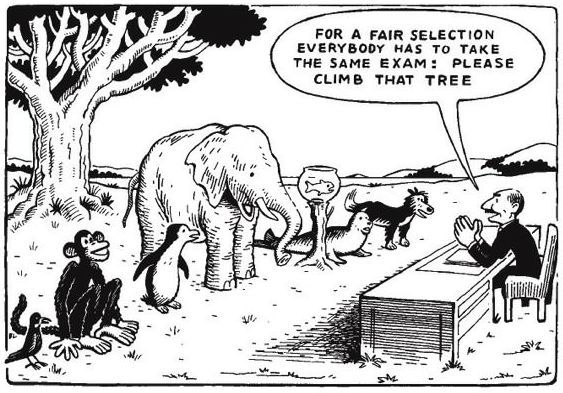
We understand now more than ever, the current way we teach students needs to change, especially in light of the recent pandemic. Education still revolves around a standards based curriculum that focuses more on test scores than critical thinking, and competing with other districts more than focusing on teaching our children about effective thinking, action, and relationships. More than ever, we have been able to see the ways that technology can assist in student-centric learning. Changes can happen, but they often happen slowly because that was just seen as the nature of change: it will happen, so why rush? Now they need to happen fast, so what is taking so long?
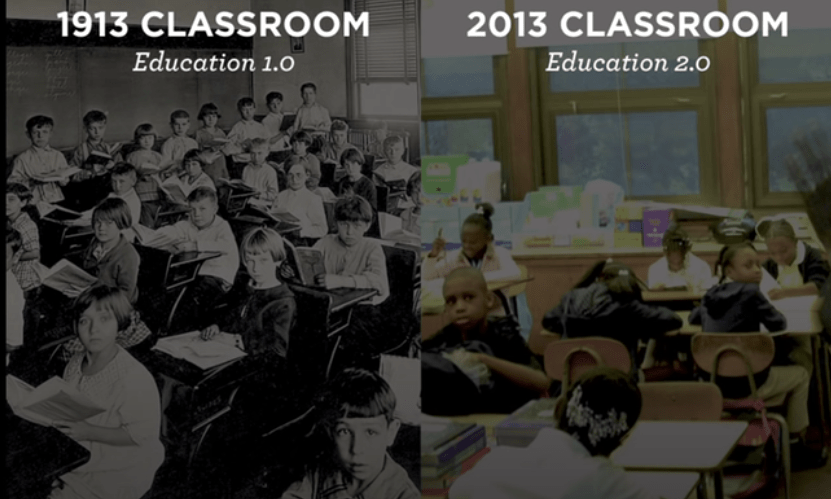
In a TEDx talk from 2013, Sajan George claimed that in 100 years, classrooms have not changed much (George, 2013). He used this picture and said that side by side, there is a 100 year difference between these two pictures. However, other than that, not much else differs (George, 2013). For example, students are still grouped by age, they sit in rows, and the teacher is seen as the “sage on the stage” so to speak. Collaborative learning continues to take a back seat in traditional classrooms, and the teacher is seen as an oracle of information. Even with all of the technological advancements we have made, we continue to use education and the current standards of today to teach students what they needed to know in the 19th and 20th century (Prensky, 2013). Prensky (2013) states that we have so many tools at our disposal, but we continually focus on the trivial uses of technology, like watching videos or projecting worksheets on a screen. We continue to do things the old way and try to also do them the new way, which is akin to keeping a horse-drawn wagon on hand in case your car breaks down. We need to start thinking about technology as extensions of human capabilities, and stop just looking at technology as the inclusion of iPads and computers.
Recent trends in educational technology include the increased proliferation of adaptive learning technologies (ALT), and the increased prevalence of AR and VR technologies to name a few. These technological developments have the ability to move us into the future and make learning a truly student centered endeavor.
Adaptive learning technologies can allow education to be completely personalized. The results of the implementation of ALT are positive, with studies showing that there is an increase in student achievement and engagement through the use of ALT. It can allow students to learn at their own pace, and moves on when students show mastery of a certain concept. It does away with what we often see in traditional education, where we trod on forward despite students not fully mastering certain concepts.
The increased prevalence of AR and VR technologies is another trend we are seeing in education. AR and VR technologies can expand the range of hands-on learning experience; and that it can “enable high touch, high-cost learning experiences to be scaled up” (Brown et. al, 2020). The potential of the inclusion of these technologies are far reaching. For one, though they can be costly in the short term, they allow for students to have high value, hands on experience with far fewer materials. Additionally It can allow students to reproduce time consuming scientific experiments in the span of seconds, and in turn increases human capabilities. Students can instantly be transported to high quality recreations of locations they study in their social studies classes. These are just some of the capabilities that AR/VR technologies have.

Throughout my studies, I have developed some thoughts about how educational can move forward into the future with the smart, thoughtful implementation of technology, and an honest look at how we can shift curriculum as a whole. According to “Technology in Early Education” (Education Commission, 2012), educators must seek to connect with many different sectors of there community to allow for a sense of connectedness and to give them the ability to determine what new technologies to consider. School districts should collaborate with early ed programs, libraries, museums, afterschool programs, adult education, and health services to allow for a streamlining of the use of technology, and that technology should be backed by research from higher education organizations. This would solve one problem, but how can we change the very system of education?
Prensky (2013) advocates for an elimination of the idea of education existing in separate classes and subjects. He advocates for k-12 education to focus on 3 areas: effective thinking, action, and relationships. With a focus on effective thinking, students would learn about portions of math, science, logic, persuasion, and even storytelling, but everything would be interconnected. Prensky writes the following:
“Students would learn from the earliest grades how to involve world databases, knowledge, sources, and teams in their thinking processes—for example, by creating and analyzing their own surveys of worldwide student opinion on current topics. As the years progress, students would learn about mindfulness; historical elements of human thinking (tool creation, logic, deduction, induction, calculus, and so on); dangerous flaws in human thinking (for example, Daniel Kahneman’s exploration into the irrational ways we make decisions about risk); critical analysis; scientific thinking; mathematical thinking; systematic skills for problem solving; and ways to obtain self-knowledge of one’s strengths and passions. Teachers would teach these skills, with both reading and technology as deep foundations.”
Effective action would transform class activities into project based, real-life initiatives based on the community needs of the student body. In regards to this, Prensky offers a way of thinking about this new framework:
“Over the course of their K–12 time, students might explore and undertake such actions as mobilizing citizens for lobbying; building local Internet infrastructure; designing new schools and school additions; and, in places that need it, improving public health and the water supply. Instead of being occasional side projects in subject-oriented classes, learning how to do these types of projects—and actually doing them—would be the main focus of this portion of students’ work.“
Effective relationships refer to the idea of fostering communication skills. Nowadays, our social emotional curriculum is something that is often emphasized, but with seat time requirements and the strict allocation of curriculum minutes for math, reading, writing, science, and social studies, we rarely find time as educators to teach common social skills the way they should be taught. Prensky(2013) talks about the importance of building real world social skills, and that education is the key to teaching children how to be flexible members of society who can not only interact with others, but relate to them.
“Over the course of their K–12 experience, students would learn how to maximize their own communication strengths and mitigate their weaknesses. They would learn how to best fit their own personality with all the communication possibilities offered in today’s and tomorrow’s world. Students would learn how to succeed in both the face-to-face world of visual prejudgments and the online world of easy deception.“

We will see change happen very quickly in the coming months, and educators have the ability to adapt at the same rate. I see the current model of education shifting drastically, and I am excited for what the future brings.
References
Leer, R., & Ivanov, S. (2013). Rethinking the future of learning: The possibilities and limitations of technology in E\education in the 21st Century. International Journal Of Organizational Innovation, 5(4), 14-20.
Prensky, M., (2013) Our Brains Extended. Educational Leadership, 70(6) 22-27.
Education Commission. (August 2012). Technology in Early Education: Building Platforms for Connections and Content that Strengthen Families and Promote Success in School. The Progress of Education Reform, 13(4), 1-7.
George, Sajan. [TEDx Talks]. (2013, March 6). The Future of Education: Sajan George at TEDxUNC [Video]. YouTube. https://www.youtube.com/watch?time_continue=235&v=Ah-SmLEMgis&feature=emb_title
Brown,Malcomb. McCormack,Mark. Reeves,Jamie. Brooks, Chistopher D.and Grajek, Susan. 2020 EDUCAUSE Horizon Report, Teaching and Learning Edition. Louisville, CO: EDUCAUSE. 2020 Horizon Report for Higher Education
How one man’s ideas shaped today’s educational landscape
by Nick Gurrieri
Let me start by saying that I am fortunate enough to teach in a district where my coworkers and the people around me are not only dedicated, but also more than willing to share their ideas and help other professionals. The first few years of teaching are difficult enough, but without a support system it becomes nearly impossible. I have developed a network of fellow educators that inspire me and from them, I have borrowed many tried and true strategies for teaching a diverse group of learners. That said, I feel that it is important as an educator to honestly reflect on your own practice and critically look at how you teach, and find shortcomings in the educational system that we find ourselves entrenched in. It is a deeply flawed system, which goes through many shifts and is seemingly always in flux. Lately, I feel there is such an emphasis on testing that large portions of my school week are spent administering tests, interim assessments, and the like, rather than actually teaching.

I feel that even despite the research in regards to effective teaching and ideological advancements made in the interest of creating classrooms that are inclusive, culturally relevant, and democratic, as educators we still fall prey to the culture of creating students who are compliant rule followers who are told what to think, and not necessarily how to think. There is hope, however, that things can change and many of the current issues we are faced with today can be solved through education.
I believe that the publication of John Dewey’s Democracy and Education: An Introduction to the Philosophy of Education in 1916 was a highly significant event that shaped the landscape of education today as we know it, and will be used as a framework for creating a more democratic classroom as schools move away from the “teach-test-teach-test” framework.
Education had gone through many paradigm shifts prior to this publication. Colonialism would spawn a school system that was largely indicative of a period during which white, upper class men would dominate society. Opportunities were reserved for the sons of certain social classes who were destined for leadership positions, and women, people of color, and lower class citizens were not privy to the same opportunities (Sass, 2014). Ideas about education continued to change in the coming centuries, but a lot of the ideas ended up perpetuating the idea of a “factory model of education” that encouraged compliance, rote skills, and preparation for working in a factory environment (Sass, 2014). Dewey’s ideas marked a departure from the old versions of education, as it was more focused on making schools more effective agents of democracy (Sass, 2014). Dewey, who is often considered the father of constructivism, an educational model focused on individualism, contended that learning is a social activity that requires students to construct their own understanding based on their own personal experiences. Dewey writes “No thought, no idea, can possibly be conveyed as an idea from one person to another… only by wrestling with the conditions of the problem firsthand, seeking and finding his own way out, does he think… the joy which children themselves experiences is the joy of intellectual constructiveness.” (Dewey, 1916) Dewey made many claims that were ahead of his time. He emphasized the importance of a rigorous curriculum that developed a solid base in content knowledge (Stobie, 2016), but believed that content knowledge, while necessary, is not sufficient for a complete education. Dewey also believed that schools at that time were more effective at promoting passive, compliant individuals rather than autonomous free thinkers who had the ability to make informed decisions given the unpredictability of everyday life. In his writings, he also claims that while democracy is a great idea, it is not merely political, but ethical, and students in schools should be given the ability to make informed decisions.
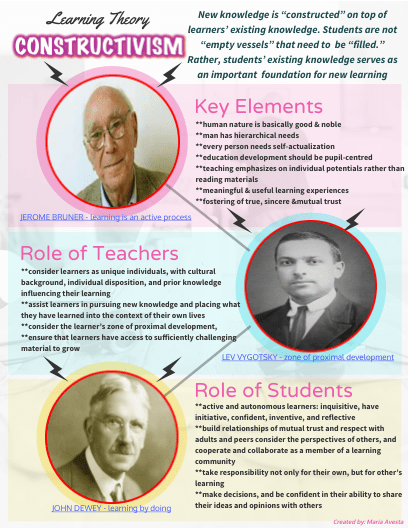
Dewey’s writings continue to impact education today. Dewey emphasized the importance of inquiry as an instructional approach, and in STEM, inquiry is a key component in learning. Inquiry based instructional approaches continue to be used in schools, and alot of the NGSS framework is centered around inquiry. Before Dewey’s pedagogy was espoused, the community, or the collective was the main concern of teachers. All students were expected to act the same way, and the avenues for a professional career were fairly limited. Dewey stated that classroom teachers and schools have a responsibility to nurture character as well as teach knowledge and skills, and I feel that as a result of his writings, social-emotional learning and culturally relevant teaching practices have arisen. Dewey also understood that the best teachers were ones that responded quickly to student work, and indicated their current level of understanding. He was a proponent for formative assessment before it became widely used, and now, especially during remote learning, the idea of providing constant, specific feedback to students to indicate their current level of understanding remains a paramount concern for education. Due to Dewey’s work, teachers work harder to challenge and engage students, relate learning to individual experience rather than just speaking, listening, reading and writing facts, and adjust their teaching according to their student’s needs.
I think that in years to come, as learning becomes more technologically based especially in the face of remote learning, Dewey’s ideas will be transferred to online/ adaptive learning platforms that consider student’s individual needs and experiences and work to adjust learning accordingly. As concerns about increased screentime due to remote learning continue to rise, I think that Dewey’s ideas about experience being the key component in learning will start to encourage parents to consider a more holistic, student driven approach to learning. I also feel that with decreases in public school funding, more of education will be moved to charter and private schools, where these constructivist educational models are more prevalent.
References
Dewey, J. (1916). Democracy and education: An Introduction to the Philosophy of Education. New York: Macmillan.
Sass, E. (2014, Feb 13). American Educational History: A Hypertext Timeline.
Stobie, T. (2016). Reflections on the 100th year anniversary of John Dewey’s ‘Democracy and Education.’ Retrieved from https://blog.cambridgeinternational.org/reflections-on-the-100th-year-anniversary-of-john-deweys-democracy-and-education/
Digital Media Video Blog Post
by Nick Gurrieri
Digital Citizenship Statement
by Nick Gurrieri
I have learned a lot these past few weeks in my Digitally Mediated Teaching and Learning class. I have learned about online identity, how it is perceived, and about privacy and copyright. I have also learned about blogging, personal learning environments, collaborative learning, and most importantly, digital citizenship. I have never felt the need to understand digital citizenship more than I do at this moment. The current educational landscape is one that exists in a digital world, and online spaces are a huge part of our reality. Previously, my viewpoint was that my online identity and personal, real life identity were separate, but the more I have learned, the more I have realized that an online identity can very thoroughly convey the “self” if it is visible and current. According to Identity Technologies : Constructing the self online, Rak & Poletti (2013) state that online spaces and the activities people partake in online are closely tied to the construction of the offline world, regardless if people use the internet or not. This has made me more aware of my own digital identity and digital citizenship as a whole from the perspective of an educator.
However, as a teacher, I never look at things from the perspective of “what can this do for me?”, but rather “what can this do for me and my students?”, and with the emergence of remote learning I have been able to see the importance of teaching my students how to be good digital citizens. It isn’t as if digital citizenship wasn’t important before, but now, more than ever, students need to be aware of their use of digital media and how it can affect themselves and others. In “Nine Elements of Digital Citizenship”, Michelle Heckaman (2017) writes “We, as educators, have a responsibility in a civilized society to communicate in a manner that is respectful and understanding of others. We have a responsibility to teach effective communication skills to our students.” I have seen the need for my students to develop the skills and have the tools to navigate the digital world while monitoring their individual online usage, and also respecting others.
There are three essential rudiments embedded in the ideals of each of the nine elements that target REP: respect, education, and protection. Some great lesson plans and other resources can be found online that can help you get started, but the bottom line is it is never a bad time to teach your students about digital citizenship.
This video provides a quick overview of the 9 elements of Digital Citizenship
How do we become better digital citizens?
Ribble introduces the “S3” framework which stands for “safe, savvy, and social” as a way to help students understand and remember the important tenets of digital citizenship. Safety relates to privacy, safe communication, and actual health and well being of users of technology. Being “savvy” relates to access to technology and your actual fluency with it, and the “social” aspect of S3 relates to connecting with and respecting others and yourself as a digital citizen. I think that there are a few important things to keep in mind whether you are teaching digital citizenship or trying to be a good one.
Know your mark
Pay attention to the footprint you leave. Social media, video posts, blog posts, and even comments you leave on other media are usually left permanently, and teaching your students about the impact of their actions online while also setting a good example is important.
Connect with others
While safety is something to keep in mind, understanding the myriad of ways in which you can connect with others in the digital world is vital to being a digital citizen. Not only that, but be kind in your interactions with students
Be safe
Above all, students need to understand that with the widespread accessibility of technology, there are those who would wish to harm you as well as help you. Understanding how to keep your personal information to yourself, analyzing credibility and user friendliness of apps and software, and understanding how to properly cite sources so they don’t inadvertently steal the intellectual property of others is very important. I think that with these three things in mind, you can be a respectful and savvy digital citizen.

Privacy
I have learned a lot about privacy as well, and what I have learned has also given me a guideline on how to act and present myself digitally.
According to “Generational Views of Information Privacy?”, Regan, Fitzgerald, and Balant (2013) make the contention that there are generational differences between concern in privacy, but they found a few things to be true: as users of technology became more fluent in their use of it, they found that users were more concerned or aware about their privacy being violated. There were some generational differences that indicated those who were part of generations where there was more trust in government authority had less concern about their privacy being violated. Millennials were actually much more concerned than originally thought. In this study.
Additionally, Camp (2015) states that the key to maintaining digital privacy lies in minimizing your data collection in “Computing Ethics: Respecting People and Respecting Privacy”. In this peer-reviewed article, Camp (2015) argues that providing respect for people will help guide good security design from the standpoint of the developer, but as a user, educating yourself on privacy and security practices and minimizing your data usage can be helpful as well. In this article, 3 reasons to seek data minimization to protect privacy and security are claimed.
First, collecting and transmitting data exacerbates the rist of data exfiltration, which is a leading risk in security attacks (Camp, 2015). Attackers can find a myriad of ways to subvert a device to gain knowledge of the user’s credentials. A terrifying example of this is that attackers can access outward facing computer cameras and examine accounts long before exploitation can occur without the user’s knowledge.
Additionally, Camp (2015) states that data minimization can reduce the risk to businesses. Software developers accrue risk when they develop apps or software that can leak phone information to support advertisements. This may be a profitable business decision, but can destroy markets when privacy controls are reduced. Camp (2015) cites an example of the app “Girls Around Me”, which used Foursquare data to display facebook profiles of women near the user’s location. The app not only violated privacy, but the developers lost inordinate amounts of money for this (Camp, 2015)
Lastly, data minimization can prevent or reduce legal problems for software developers (Camp, 2015). Some apps like Superfish or StealthGenie have been considered spyware, and some apps have been marked and investigated for wiretapping. Privacy violations like this can destroy the credibility of businesses.
Two things need to happen in order to maintain privacy. One is that designers need to respect a code of ethics, and those with the skills and knowledge to develop software need to take accountability for protecting privacy, and face the consequences of avoidable privacy violations of their users if it is due to the developers bad design or lack of information about privacy. Secondly, users need to be careful and aware of their use of technology, and educate themselves on how to analyze software for lack of security or inherent risk. I know that as a teacher, I need to be careful about the data that I share, and I think living by the idea that “less is more” will go a long way.
Copyright
Understanding copyright in the digital age where everything is so easily accessible is not only important, but a necessity for an educator in the 21st century. According to “Copyright for Academics in the Digital Age”, Ramsey and McCaughey (2012) state that instead of promoting knowledge, the act of putting materials for teaching on the web can undermine it.
Ramsey and McCaughey state “Ultimately, it is only when faculty members fully recognize the rights and powers they possess as the original owners of the copyrights to their academic works that they will be able to use the web and other digital communication technologies in a way that avoids the unintended consequences: an erosion of their academic freedom and an unnecessary limitation on the flow and advancement of academic and scholarly knowledge.” This has led me to come to the conclusion that the more you share in regards to your own intellectual property, the more you set yourself up for the dispersion and possible perversion of your own knowledge and content. This will lead me to make informed decisions as to what I share. I teach lower elementary right now, so I am not super concerned about my students stealing my intellectual property, but the use of creative commons to limit the dispersion of lectures or adding copyright statements to syllabi and other course materials is very helpful for the higher education teacher in the current landscape.
In summation, I will strive to fully understand the privacy and copyright laws that pertain to me before I post something, in order to cultivate an online identity that is positive and be a good digital citizen while also being the best teacher I can be.
References
Heckaman, M., & Ribble, M. (2017, September 10). Nine Elements of Digital Citizenship – Mike Ribble. Retrieved June 4, 2020, from https://choraltech.wordpress.com/nine-elements-of-digital-citizenship-mike-ribble/
Rak, J., & Poletti, A. (2013). Identity technologies: Constructing the self online. Madison, Wisconsin: University of Wisconsin Press.Davis, V. (2017, November 1). What Your Students Really Need to Know About Digital
Citizenship. Retrieved June 3, 2020, from https://www.edutopia.org/blog/digital-citizenship-need-to-know-vicki-davis
Common Sense Media. (2018, June 14). What’s The Big Deal About Internet Privacy? (9-12). Retrieved June 3, 2020, from https://www.commonsense.org/education/lesson/whats-the-big-deal-about-internet-privacy-9-12
Ramsey, C., & McCaughey, M. (2012). Copyright for Academics in the Digital Age. Academe, 98(5), 10–17.
Regan, P. M., FitzGerald, G., & Balint, P. (2013). Generational views of information privacy?. Innovation: The European Journal Of Social Sciences, 26(1/2), 81-99. oi:10.1080/13511610.2013.747650
Camp, L. J. (2015). Respecting people and respecting privacy. Communications Of The ACM, 58(7), 27-28. doi:10.1145/2770892
References for digital media
Granite School District. (2019, August 30). Retrieved from https://www.graniteschools.org/edtech/digcit/
Digital Citizenship Resources / Digital Citizenship Resources. (2018). Retrieved from https://www.mps-edu.org/domain/766
J. (2019, June 3). Internet privacy matters. Retrieved from https://campuspress.yale.edu/tribune/internet-privacy-matters/
FindLaw. (2019, July 23). What is Copyright? Retrieved from https://smallbusiness.findlaw.com/intellectual-property/what-is-copyright.html
ChanceandSimon. (2017, May 23). Nine Elements to Digital Citizenship. Retrieved from Youtube.
5 Lessons I Learned by Becoming a Student Again
by Nick Gurrieri
I admittedly was a bit rusty when it came to being a student. It hadn’t been very long, as I graduated in 2017, but I walked into grad school (I use the phrase “walked in” lightly, since we aren’t allowed in the building at the moment) with virtually no expectations. I was a blank slate. In my undergrad days, I took for granted the myriad of resources I had available to me while in the professional education program. I was so impatient and wanted to get in there and just teach. As it turns out, I knew very little on how to teach effectively, and a lot of what I know now was developed through “on-the-job training”, so to speak. Truthfully, I never really knew what teaching was like until I had 20 plus students staring at me on the first day of school, the door closed, and I knew that it was just me in there. I thought about the gravity of the situation I found myself in, and then I thought “by God what did I just get myself into?” To top it off, my building has no AC so as you can imagine I was sweating bullets on the first day of school.

After a bumpy start, as all teachers have, I started to get the hang of it in my third year of teaching. However, as I improved, I started to see that there is so much more to learn than I originally thought, and as soon as I thought I knew everything, I realized that I actually knew very little. With that said, I am very excited to be a student again. Yes, I am aware that “the best teachers are lifelong learners”, and I truly do stand by that, but to actually be seeing things from the perspective of a student is exhilarating, and there is a new impetus to learn things that I can apply to my teaching.
In the time that I have been a student in EDU 520, I have tried to correct a lot of the mistakes I made as an undergrad student. Grad school is a totally different ballgame. I took one look at my coursework for just the first unit of my first course in grad school and that difference was abundantly clear to me. I have had to really apply myself, but I have learned so much already in the time since I have started. We have discussed a few topics in detail: Digital literacy, digital/ online identity, how to create a website, and the benefits of blogging as well as how to create an effective blog post.
Digital literacy, in a nutshell, has to do with the ability to make sense of and utilize digital media effectively to evaluate, create, or convey information (Bhatt, 2012), and going into this course I thought I had above average digital literacy. After all, I am part of the generation that grew up with courses on computer science and keyboarding. On top of that, in my community of teachers, I am the young hot shot who knows how to do all of the “higher-level” technical stuff, like avoid hitting “reply all” in an email and downloading a Google Doc as a PDF (if you see this, no offense guys). In the age of remote learning, which started right before I began grad school, I have taken quite well to it. I am finding ways to engage my students remotely as best as I can and I have become an expert as clicking the “schedule assignment for ____” icon. As you can tell, when it came down to my own thoughts on my competency in regards to technology, I had an inflated opinion of myself, but it is merely a product of my environment. I have had my ego stroked a bit and it shows.
After starting this course, I have already noticed numerous ways that I could become more well-versed in the use of technology. This course has opened my eyes up to the possibilities of using social media as a means to develop one’s own digital identity, and has also taught me the potential implications of blogging when it comes to education. To top it off, I had never heard the letters “PLE” grouped together in the same breath, and now I can’t wait to create my own. I see the potential it has when it comes to compiling artifacts for an ePortfolio. When I look back at my previous courses, learning has seemed fragmented. Now, I have a place to compile my educational resources and store them. I can unite the unique experiences that I have during my time in grad school and I will truly see my learning from start to finish. It’s the type of experience that you dream of empowering your own students to create for themselves.
What I have learned in regards to online identity has served as a sturdy reminder of the importance of maintaining professionalism online. In the article “Identity Technologies: Constructing the Self-Online”, our online identity is projected through our use of media and it is not something like our personality as it is not an “essence”, but rather constructed (Rak & Poletti, 2013). The imprints we leave on the digital world leave a lasting impression on our online identity. Through the analysis of fellow professionals in the field education’s online presence, I have been able to picture how I want to represent myself online. This blog post is one of those imprints. I hope I do myself justice.
I have learned a lot about myself while blogging as well. I had never seen blogging as a useful tool when it comes to education, but after spending more time interacting with the course materials, I was able to see the potential impact. In “Learning Through Blogging: Use of Blogs to Enhance the Perceived Learning of pre-serviced ICT Teachers”, Kilic and Gokdas (2014) analyze the potential positive effects of blogging on learners. What they found was surprising. In their study, they looked at 75 pre-service Information and Communication Technology (ICT) teachers, and found that there was a significant difference in learning between ICT teachers who had a high sense of community with their peers, and those who had a low sense of community (Kilic & Gokdas, 2014). The perceived learning of the students with instructors who integrated blogging into their teaching was higher than students who did not blog (Kilic & Gokdas, 2014). Those students felt a greater sense of community, and 80% of them stated that blogging helped them learn overall (Kilic & Gokdas, 2014).
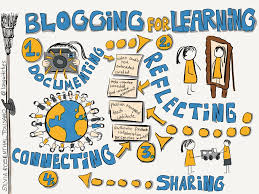
I have learned many things from other bloggers as well about how to create an effective blog, but only time will tell how my first post holds up. However, I like the idea of just reflecting and developing my own writing style in my blog as I become more comfortable with it.
References
Bhatt, I. (2012). Digital literacy practices and their layered multiplicity. Educational Media International, 49(4), 289-301.
Rak, J., & Poletti, A. (2013). Identity technologies: Constructing the self online. Madison, Wisconsin: University of Wisconsin Press.
Morrison, D. (2013, January 30). How to create a personal learning portfolio: Students and professionals. Retrieved from: https://onlinelearninginsights.wordpress.com
Kilic, E., & Gokdas, İ. (2014). Learning through blogging: Use of blogs to enhance the perceived learning of pre-service ICT teachers. Educational Sciences: Theory & Practice, 14(3), 1169-1177. doi:10.12738/estp.2014.3.1987
Follow My Blog
Get new content delivered directly to your inbox.
 Tech and Teaching